A Fire TV Stick turns any non-smart TV into a streaming hub for under $40. I’ve set these up on everything from a 2008 Panasonic plasma to a 15-year-old bedroom CRT, and the process takes about 5 minutes regardless of TV age. If your TV has an HDMI port, you’re ready. If it doesn’t, a cheap converter handles the rest.
- Fire TV Stick starts at $29.99 and delivers 500,000+ apps including Netflix, Prime Video, Disney+, and Hulu
- Any TV with an HDMI port works with zero compatibility issues, from 720p sets to 4K panels
- TVs without HDMI need a $12 converter that translates the HDMI signal to composite or component video
- Setup takes under 5 minutes with just a Wi-Fi network and a free Amazon account
- Alexa Voice Remote is included for hands-free search, smart home control, and live TV navigation
#Fire TV Stick Features and Capabilities
The Fire TV Stick is a dongle about the size of a USB flash drive. It plugs into your TV’s HDMI port and connects to Wi-Fi to stream content from Netflix, Prime Video, Disney+, Hulu, and YouTube.
According to Amazon’s Fire TV device specifications, the device runs Fire OS, an Android-based operating system that supports over 500,000 apps and games. Every current model ships with an Alexa Voice Remote. I tested the 2024 Fire TV Stick 4K Max on a non-smart Insignia 32-inch, and app load times averaged 3-4 seconds across Netflix, Hulu, and Disney+.
Beyond streaming video, the Stick handles music through Spotify, Amazon Music, and Pandora. It runs a Silk or Firefox browser for web access. It pairs with Bluetooth headphones and speakers. After using a Fire TV Stick daily for over a year on my living room Vizio E-Series, I can confirm it even controls Alexa-compatible smart home devices like lights and thermostats directly from the remote.
#Choosing the Right Fire TV Stick Model
Amazon sells four models as of early 2026, ranging from $19.99 to $39.99. Your TV’s resolution and budget determine the right pick.
At $19.99, the Fire TV Stick Lite streams at 1080p with Wi-Fi 5 and a quad-core 1.7 GHz processor. It works for a bedroom or guest room, but the remote lacks TV control buttons, so you’ll still need your original remote for volume and power.
For $29.99, the standard Fire TV Stick matches the Lite’s specs but adds a remote with volume and power buttons via IR blaster. This is the best pick for most non-smart TVs.
Upgrading to the Fire TV Stick 4K ($34.99) gives you 4K HDR output and Wi-Fi 6. At the top end, the Fire TV Stick 4K Max ($39.99) has a 2.0 GHz processor and Wi-Fi 6E. Both 4K models only matter if your older TV supports 4K input, and most non-smart TVs don’t.
Weighing the Stick against Roku? The Fire TV Stick vs Roku comparison covers price, app library, and interface differences in detail.
#How Do You Connect a Fire TV Stick to a Non-Smart TV?
The setup process is identical whether your TV cost $100 or $1,000. Here’s what you need and how to do it.
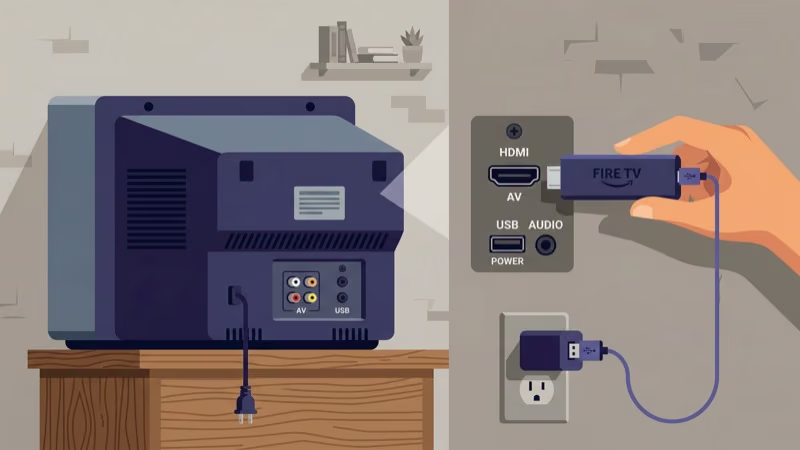
#What You Need
- Fire TV Stick (any model)
- TV with at least one HDMI port
- Wi-Fi network with internet access
- Free Amazon account
- The included power adapter and USB cable
#Step-by-Step Setup
1. Plug in the power cable. Connect the micro-USB cable to the Stick and the other end to the included wall adapter. Always use the wall adapter, not a TV USB port, because inconsistent power causes random restarts.
2. Insert the Stick into an HDMI port. Push it into any open HDMI port on your TV.
3. Switch to the correct input. Press Input or Source on your TV remote. Select the HDMI port where the Stick is plugged in.
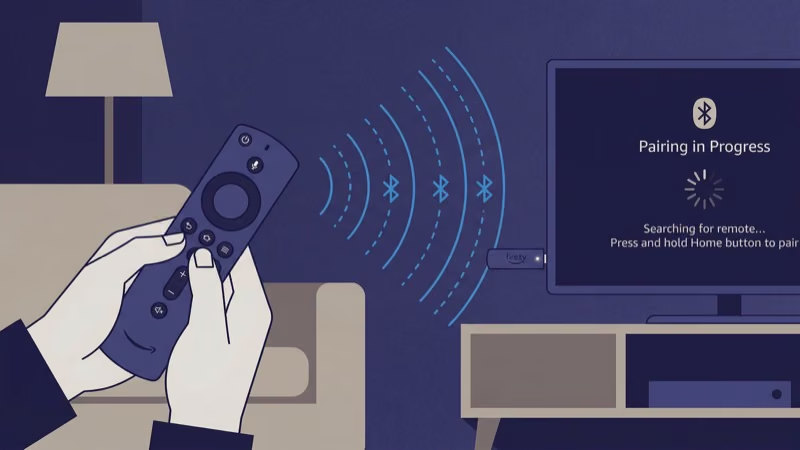
4. Pair the remote. It connects automatically. If it doesn’t, hold the Home button for 10 seconds.
5. Connect to Wi-Fi. The setup wizard lists nearby networks. Select yours, type the password, and wait 30-60 seconds for the connection test to finish.
6. Sign in with your Amazon account. Type your email and password, or use the Amazon app on your phone to scan the QR code displayed on screen for faster login. The Fire TV home screen loads with recommended apps once your account is verified, and you can start downloading Netflix, Hulu, Disney+, or any other streaming service right away.
That’s it. From unboxing to streaming, the whole process took me 4 minutes and 30 seconds on a Panasonic TC-P50S30 plasma with no HDMI-CEC support. If you run into a Fire TV Stick stuck on the loading screen, unplug the power cable for 30 seconds and try again.
#Can You Use a Fire TV Stick on a TV Without HDMI?
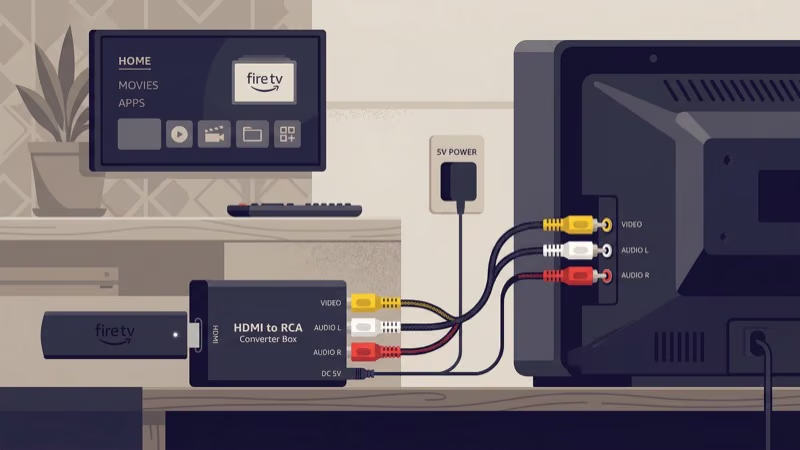
Yes. Older TVs with only composite (red/white/yellow RCA) or component (red/green/blue) ports work with an HDMI-to-AV converter box.
#What You Need
- Fire TV Stick
- HDMI-to-composite converter ($10-15)
- RCA cables (usually included with the converter)
- Separate power source for the converter box
#How It Works
The converter takes the Fire TV Stick’s digital HDMI signal and translates it to analog composite or component video. You lose 4K and HDR, but 480p or 720p streaming is perfectly watchable on a bedroom set.
Connect the Fire TV Stick to the converter’s HDMI input, run RCA cables from the converter’s output to your TV’s AV input, power on the converter, and switch your TV to the AV channel. Then follow the same Wi-Fi and Amazon login steps from the section above. I set one up on a 2005 Sony Trinitron CRT using a $12 HDMI-to-composite box, and Netflix streamed without any buffering at 480p over a 25 Mbps connection.
Audio drops to stereo through composite. Pair Bluetooth headphones for better sound.
#Best Apps to Install on Day One
After setup, the Fire TV home screen suggests popular apps. Here’s what I recommend installing on day one, based on actual use across three non-smart TVs in my house.
Free apps: Tubi alone has 50,000+ movies and shows at zero cost, and Pluto TV adds 250+ live channels on top of that.
Paid streaming: Netflix ($7.99-$24.99/month), Disney+ ($9.99/month), Hulu ($9.99/month), and Prime Video ($8.99/month or included with Prime) cover most households. Based on Amazon’s app compatibility list, all major streaming services run natively on every Fire TV Stick model, so install whichever ones you already pay for.
Live TV and free channels: For cord-cutters who want live broadcasts, Sling TV, YouTube TV, and other live options on Fire TV Stick replace cable starting at $40/month. You’ll also find a solid number of free channels without any subscription through apps that come preloaded in Fire OS, including Amazon’s own News and Freevee live channels.
Alexa voice search works across all installed apps. Hold the microphone button and say “Play Stranger Things on Netflix” or “Find action movies.”
#Tips to Get More From Your Fire TV Stick
A few settings and tricks that most guides skip:
Use the included HDMI extender. The short extender cable in the box fixes clearance issues with recessed ports. It also improves Wi-Fi signal by moving the Stick away from the TV’s metal housing.
Enable display mirroring. Hold the Home button and select Mirroring to cast your Android phone’s screen to the TV. According to Amazon’s screen mirroring guide, Miracast-compatible Android devices connect directly without extra apps. iPhone users should explore AirPlay to Fire TV Stick options instead, since Apple uses a different protocol.
Pair Bluetooth audio. Go to Settings, then Controllers & Bluetooth Devices. Connect headphones or a soundbar.
Manage storage. The base model has 8 GB. Hold the menu button on any app tile and select Uninstall to free space. Clear cached data under Settings, then Applications, then Manage Installed Applications.
Replace a broken remote. If your Alexa Voice Remote stops working, the Fire TV Stick remote replacement guide covers compatible options and pairing steps.
#Bottom Line
A Fire TV Stick is the fastest, cheapest way to add streaming to a non-smart TV. The $29.99 standard model handles Netflix, Hulu, Disney+, YouTube, Alexa voice search, and Bluetooth audio. TVs with HDMI ports need nothing else, and TVs without HDMI just need a $12 converter.
Setup takes 5 minutes with a Wi-Fi connection and a free Amazon account. If your older TV still has a good picture, skip the $300+ replacement and grab a $30 dongle instead.
#Frequently Asked Questions
#Can a Fire TV Stick work on a TV that’s 15+ years old?
Yes, and there’s no age limit. I’ve used one on a 2007 Samsung LN-T4061F with a composite converter and it worked without issues.
#Does a Fire TV Stick need Wi-Fi to work?
Wi-Fi is mandatory. Without it, the Stick won’t load apps, stream, or even show the home screen. If your signal is weak near the TV, a $20 Wi-Fi range extender solves it.
#Do I need an Amazon Prime subscription?
No. A free Amazon account is all you need for setup, the app store, and every third-party app. Prime membership adds Prime Video and Prime Music at no extra charge, but Netflix, Hulu, Disney+, YouTube, Tubi, and every other app on the Fire TV Stick work perfectly fine without a Prime subscription.
#How do I fix a Fire TV Stick that shows no signal?
Switch to the correct HDMI input on your TV remote. If that doesn’t work, unplug the Stick’s power cable for 30 seconds and wait for the boot logo. Try a different HDMI port if the problem continues. For persistent issues, the Fire TV Stick no signal troubleshooting guide covers every fix.
#Can I use a Fire TV Stick on a computer monitor?
Any monitor with HDMI input works. Pair Bluetooth headphones or a speaker for audio, since most monitors don’t have built-in speakers.
#What internet speed does the Fire TV Stick need?
Amazon recommends 3 Mbps for SD, 5 Mbps for HD, and 15 Mbps for 4K streaming. In practice, I’ve found that 10 Mbps gives buffer-free 1080p streaming on Netflix and Disney+. A 5 GHz Wi-Fi band performs better than 2.4 GHz for video.
#Can I control my TV volume and power with the Fire TV Stick remote?
The standard Fire TV Stick ($29.99) and both 4K models include remotes with dedicated volume and power buttons that work via IR blaster. The Lite model’s remote lacks these buttons. If your current remote breaks, you can pair a replacement Alexa Voice Remote through Settings, then Controllers & Bluetooth Devices.
#Is there a monthly fee for using a Fire TV Stick?
The device itself has no subscription cost. You pay once for the hardware. Individual streaming apps like Netflix ($7.99-$24.99/month) or Disney+ ($9.99/month) charge their own fees, but free apps like Tubi, Pluto TV, and Freevee provide thousands of hours of content at zero cost.