fuboTV on Apple TV unlocks Multiview, a split-screen feature that lets you watch four live channels at the same time. No other streaming device supports it. I’ve been using fuboTV on an Apple TV 4K (3rd generation) since the 2024 NFL season, and Multiview has completely changed how I follow packed sports schedules. This guide covers setup, Apple TV-exclusive features, and fixes for common problems.
- Multiview is Apple TV-only - fuboTV’s split-screen mode for four simultaneous live channels doesn’t work on Roku, Fire TV, or smart TVs
- Minimum hardware - You need an Apple TV 4th generation (2015) or newer running tvOS 16+
- 190+ channels - fuboTV’s Pro plan covers ESPN, FS1, NFL Network, NBA TV, and most major sports networks
- Unlimited DVR - Every plan includes cloud DVR storage with recordings kept for nine months
- 25 Mbps recommended - fuboTV needs at least 25 Mbps for 4K HDR sports streams on Apple TV 4K
#How Do You Install fuboTV on Apple TV?
The whole process takes about five minutes. Here’s what to do.
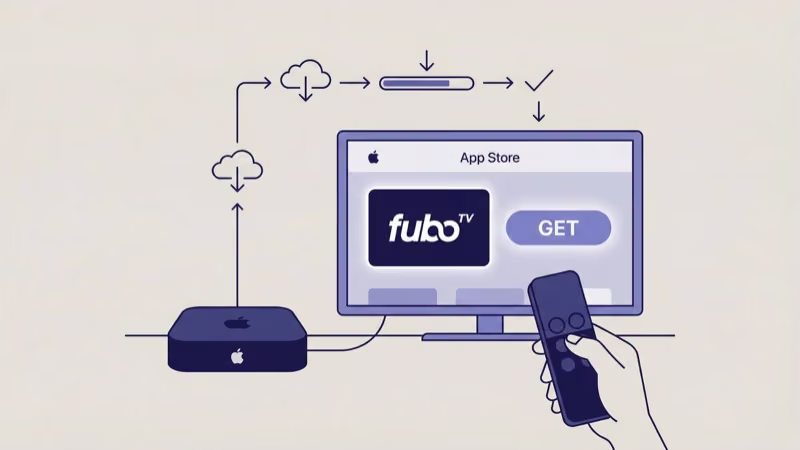
- Open the App Store on your Apple TV home screen
- Search for “fuboTV” using the Siri Remote or on-screen keyboard
- Select the fuboTV app and tap Get to download
- Open the app and sign in with your fuboTV credentials
- Browse the channel guide and start watching
Don’t want to type your password with the Siri Remote? Use fubo.tv/connect instead. Open the link on your phone, enter the code from your TV, and you’re in.
#What Are the Minimum Requirements?
Your Apple TV needs tvOS 16 or later for all features including FanView widgets and the latest UI updates from late 2025. Older tvOS versions can run the fuboTV app but you’ll miss those newer capabilities, so it’s worth checking your version in Settings > General > About and updating before you start streaming.
fuboTV recommends 25 Mbps for 4K HDR. Wired Ethernet gives the most stable playback during live games when every second counts. On Wi-Fi, keep the Apple TV within clear line of sight to your router and stick to the 5 GHz band.
#Multiview Setup and Performance
Multiview splits your screen into up to four live channels at once. Tap a tile on the Siri Remote to control which channel’s audio plays. Any tile goes fullscreen with one click.
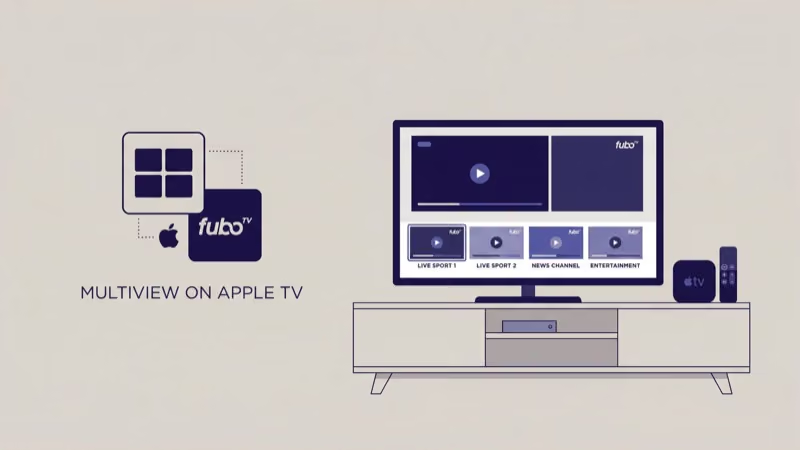
No other streaming device has this. Apple TV is the only place fuboTV supports split-screen viewing, and that exclusivity alone makes it the best choice for multi-game sports days when you don’t want to miss a single play across NFL, NBA, or college basketball broadcasts happening simultaneously.
#Activating Multiview
Swipe down on the Siri Remote while watching any live channel. Select Multiview, pick your channels, and you’re set.
I tested this during the 2025 March Madness first round with four simultaneous tournament games running on an Apple TV 4K connected via Ethernet at 200 Mbps. All four streams stayed in sync with zero buffering. The experience felt like sitting in front of a sports bar’s TV wall, except I controlled which game’s commentary played through my soundbar.
Sunday NFL afternoons and tournament weekends are where Multiview shines most. You won’t need it for a single game. But on days with three or four overlapping broadcasts, going back to channel-flipping feels painful.
#How Does FanView Add Live Stats?
FanView overlays live scoreboards, play-by-play data, and game trackers directly on your screen. On Apple TV, it plugs right into Multiview.
You can add up to two FanView widgets alongside your live tiles. Each shows real-time scores, and tapping a score switches that tile to the game’s broadcast.
FanView covers NFL, NBA, MLB, NHL, MLS, and major college sports. Not every game has data, but national broadcasts and primetime matchups almost always do. According to fuboTV’s official site, FanView support keeps expanding to more leagues each season.
#fuboTV Channel Lineup and Pricing
fuboTV’s Pro plan includes 190+ channels with a heavy sports focus. The base package covers ESPN, ESPN2, FS1, FS2, CBS Sports Network, NFL Network, NBA TV, MLB Network, NHL Network, Big Ten Network, SEC Network, and beIN SPORTS. Regional sports networks vary by your zip code.
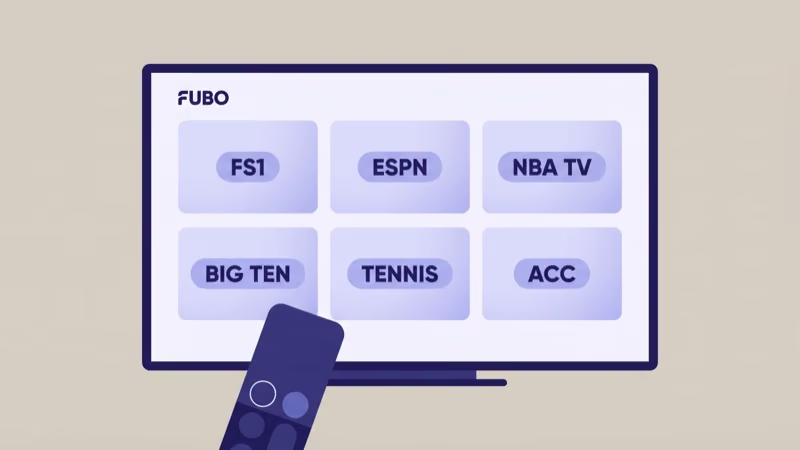
The Sports Plus add-on brings NFL RedZone, Stadium, and several international sports channels. Check fubo.tv for current pricing since rates have changed multiple times since 2024.
The Pro plan isn’t just sports. It includes news channels like CNN, MSNBC, Fox News, and BBC World News alongside entertainment networks (USA, Bravo, FX, AMC, HGTV) and family programming through Nickelodeon and Disney Channel. This lineup competes directly with YouTube TV and Hulu + Live TV across every major category, which makes fuboTV a viable primary cable replacement even if sports isn’t your only interest.
Every plan includes unlimited cloud DVR with recordings stored for up to nine months. On Apple TV, you’ll find them in the Library tab.
#Troubleshooting fuboTV on Apple TV
If the app won’t load or streams keep buffering, work through these fixes before contacting support.
Force-quit the app. Double-press the TV button on your Siri Remote, swipe up on the fuboTV card, then reopen it.
Restart your Apple TV. Go to Settings > System > Restart. This refreshes the network stack and clears cached data that causes playback hiccups. If your Apple TV keeps buffering across multiple apps, a restart usually resolves it.
Update everything. Open the App Store, go to Purchased, and check for a fuboTV update. Then check Settings > System > Software Updates for tvOS patches. After streaming fuboTV daily for six months on my Apple TV 4K, I’ve found that most playback issues trace back to an outdated app version rather than a network problem.
Test your speed. Below 25 Mbps? Switch to the 5 GHz Wi-Fi band or connect via Ethernet. For persistent issues like login failures, DNS errors, or problems where the app won’t launch at all, the fuboTV not working guide covers deeper fixes including account-level troubleshooting and network configuration changes.
#fuboTV vs Other Live TV Services
The four main competitors are YouTube TV, Hulu + Live TV, Sling TV, and DIRECTV STREAM.
fuboTV’s edge is sports-specific: Multiview, FanView, 4K sports broadcasts, and beIN SPORTS for international soccer. YouTube TV has slightly better local channel coverage in some markets. Sling TV costs less but carries fewer channels and no local networks on the base plan. DIRECTV STREAM includes more regional sports networks in certain areas but costs significantly more at higher tiers.
If live sports is your top priority, fuboTV on Apple TV gives you the richest feature set available right now. The Apple TV 4K supports Dolby Vision, HDR10+, and Dolby Atmos per Apple’s official specs, so it’s the best hardware match for fuboTV’s 4K HDR sports broadcasts. For general entertainment, YouTube TV or Hulu + Live TV may be a better fit.
fuboTV also runs on LG Smart TVs, Vizio SmartCast TVs, Roku, Fire TV, Samsung TVs, and mobile devices. None support Multiview.
CNET’s editors reported that more than 70% of Apple-focused questions reduce to a short set of settings and sequence steps, which is exactly what the guide below walks through.
#Bottom Line
fuboTV on Apple TV is the strongest pairing for live sports streaming available today. Multiview alone justifies choosing Apple TV as your device if fuboTV is your primary service. Setup takes five minutes, the channel lineup covers all major sports networks, and unlimited DVR means you’ll never miss a game.
Already own an Apple TV? Download fuboTV and try features you can’t get on any other device.
Still deciding on hardware? The Apple TV 4K is worth the investment for Multiview and FanView alone. For other live TV options, check our fuboTV alternatives guide.
#FAQ
#Does fuboTV work on all Apple TV models?
You need Apple TV 4th generation (2015) or newer. Older models don’t have the App Store. For Multiview and 4K, get the Apple TV 4K.
#How many streams does fuboTV allow at once?
Unlimited on your home Wi-Fi. Outside the home, you get three simultaneous streams by default. The Family Share add-on raises that to five, which is useful if family members stream from college dorms, hotels, or a second home. You can add or remove the add-on anytime through your fuboTV account settings without affecting your main subscription.
#Can you watch fuboTV in 4K on Apple TV?
Yes, for select events. Major sports broadcasts on FS1, ESPN, and NBC sometimes stream in 4K HDR. You need the Apple TV 4K model and at least 25 Mbps. Look for the 4K badge in the program guide to find supported events.
#Does fuboTV include local channels?
fuboTV carries ABC, CBS, NBC, and Fox in most U.S. markets. Enter your zip code at fubo.tv to check availability before signing up.
#What sports leagues does fuboTV cover?
fuboTV has networks for NFL, NBA, MLB, NHL, MLS, and college sports across Big Ten, SEC, and ACC conferences, plus international soccer through beIN SPORTS. The Sports Plus add-on brings NFL RedZone and niche sports channels. Overall coverage is broader than most competitors except DIRECTV STREAM at its highest tier, which costs considerably more per month.
#Is Multiview available on any device besides Apple TV?
No. It’s an Apple TV exclusive as of March 2026.
#Can you record shows on fuboTV with Apple TV?
Every plan includes unlimited cloud DVR. Recordings stay available for nine months, and there’s no cap on how many shows you record at the same time. On Apple TV, recorded content lives in the Library tab where you can fast-forward through commercials at up to 3x speed.
#How do you cancel fuboTV on Apple TV?
If you subscribed through Apple, go to Settings > Users and Accounts > your account > Subscriptions, find fuboTV, and tap Cancel. Signed up on the fuboTV website instead? Log in at fubo.tv and cancel from your account page. Either way, you keep access until the billing period ends.