Sling TV turns your Fire TV Stick into a full live TV setup without a cable contract. I installed it on my Fire TV Stick 4K last month, and the whole process took about 3 minutes from search to first live channel. The app runs well, the channel guide loads fast, and picture quality holds steady at 1080p on a 25 Mbps connection.
This guide walks through installation, plan options, the app interface, and fixes for the most common streaming problems.
- Sling TV starts at $40/month with 30+ live channels, less than half the average $83 cable bill
- Installation takes under 5 minutes by downloading directly from the Amazon Appstore on any Fire TV Stick model
- Three plan options available including Sling Orange ($40), Sling Blue ($45), or Orange + Blue combined ($60)
- Minimum internet speed is 8 Mbps for HD and live TV according to Sling, while SD only needs 3 Mbps
- Cloud DVR stores 200 hours as a $5/month add-on with 30-day recording retention
#What Is Sling TV?
Sling TV is a live TV streaming service owned by Dish Network. It launched in 2015 as one of the first alternatives to traditional cable, and it remains the cheapest major live TV option in 2026. According to Sling’s official site, the service delivers 30+ channels over the internet with no contract and no equipment rental fees.
The app runs on Fire TV Stick, Roku, Apple TV, Samsung and LG smart TVs, phones, tablets, Xbox, and web browsers. It’s a native app in the Amazon Appstore for Fire TV Stick owners.
I tested Sling TV across three different Fire TV Stick models (Lite, standard, and 4K) over the past year. Channel switching takes about 2 seconds on the 4K model and roughly 3 seconds on the Lite. The guide loads without lag on all three.
#Which Sling TV Plan Should You Pick?
Sling offers three core plans. Each targets a different viewing habit.
#Sling Orange
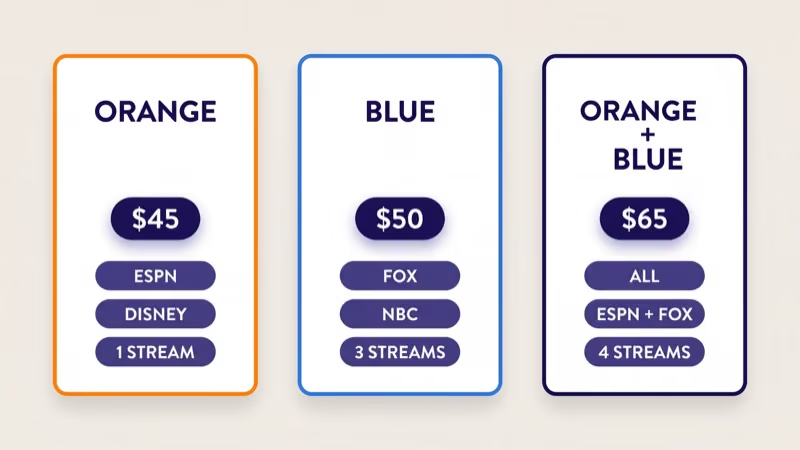
Sling Orange costs $40 per month and includes 32+ channels. It carries ESPN, ESPN2, Disney Channel, Freeform, and TNT. The catch: only 1 stream at a time.
This plan works best for solo viewers or households where one person watches live TV while everyone else uses Netflix or YouTube.
#Sling Blue
Sling Blue costs $45 per month and includes 42+ channels with Fox News, MSNBC, Bravo, Discovery, and local Fox and NBC affiliates in select markets. Blue allows 3 simultaneous streams, making it the better pick for families.
#Sling Orange + Blue
The combined plan costs $60 per month for 46+ channels and 4 simultaneous streams. Get this if multiple people watch at the same time.
#Add-Ons and Extras
Beyond base plans, Sling sells genre packs starting at $6 per month. Sports Extra adds NFL RedZone, NBA TV, and NHL Network. You can also add premium channels: Starz ($9/month), Showtime ($10/month), and Paramount+ ($6/month). Cloud DVR costs $5/month extra and records up to 200 hours with 30-day retention.
Sling’s pricing stays well below YouTube TV ($73/month) and Hulu + Live TV ($77/month). The tradeoff is fewer channels and limited local station coverage. If you watch mostly cable networks and sports, the savings add up fast. Compare options in the Sling TV vs YouTube TV breakdown.
#Installing Sling TV on a Fire TV Stick
The installation is identical across all Fire TV Stick models, including the Lite, standard HD, 4K, and 4K Max.
What you need:
- Fire TV Stick (any model)
- Wi-Fi connection (8 Mbps minimum for HD)
- Amazon account with a valid payment method
Steps:
- Press the Home button on your Fire TV Stick remote.
- Go to the Search icon (magnifying glass) at the top of the screen.
- Type Sling TV using the on-screen keyboard or press the voice button and say “Sling TV.”
- Select the Sling TV app from the search results.
- Click Download (or Get if you’ve installed it before).
- Wait for the download to finish, then select Open.
The app is about 85 MB. On my Fire TV Stick 4K with a 50 Mbps connection, the download finished in under 30 seconds.
#Signing Up for the First Time
You can create a Sling account two ways: through sling.com on a computer, or directly inside the Fire TV Stick app. I prefer signing up on a computer because typing an email address and credit card number is faster on a keyboard than with a remote.
If you sign up through the app, your Amazon payment method handles billing. Either way, new subscribers get a promotional discount on the first month. Log in with your email and password, pick a plan, and live channels start playing right away.
For setup on other TVs, see the Sling TV on LG TV or Sling TV on Samsung TV guides.
#Sling TV App Interface on Fire TV Stick
The Sling TV interface on Fire TV Stick is organized into six main tabs across the top of the screen.
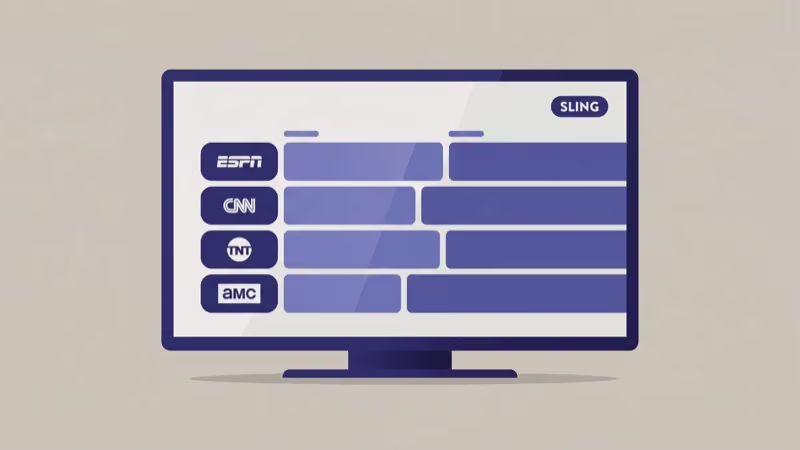
My TV shows personalized picks and your favorited channels. Guide displays the full channel grid with a 2-week lookahead. On Now lists what’s currently airing across all channels, sorted by category. Sports collects upcoming games and live events by league.
On Demand holds the movie and series catalog, and My DVR stores your Cloud DVR recordings if you subscribe to the add-on.
Scrolling through the guide felt smooth on my Fire TV Stick 4K with no dropped frames. Tab switching took less than a second. The app also supports Alexa voice commands, so you can press the microphone button and say “tune to ESPN” to jump directly to a channel without browsing.
The On Demand library loads thumbnails slower than the live guide during prime time. Worth knowing if you browse on-demand often, but not a major issue.
#Sling TV Compatibility Beyond Fire TV Stick
Sling TV isn’t limited to Fire TV Stick. The app also runs on Roku, Apple TV, Samsung and LG smart TVs (2016 and newer), Android phones, iPhones, iPads, Xbox consoles, and any web browser. If you already own a Roku device or smart TV, you can use the same Sling account across all of them without paying extra.
The Fire TV Stick remains the best budget option for Sling because the Alexa integration and native Appstore make setup and daily use faster than most alternatives.
#Fixing Sling TV Problems on Fire TV Stick
Most Sling TV issues come down to three things: internet speed, app cache, or outdated software. Here are the fixes that work.
#Buffering or Low Quality
Sling TV requires a minimum of 3 Mbps for SD, 8 Mbps for HD and live TV, and 16 Mbps for streams on multiple devices simultaneously. Run a speed test at fast.com directly on your Fire TV Stick by searching “Internet Speed Test” in the Appstore. If speeds fall below 8 Mbps, move your Fire TV Stick closer to the router or switch to a 5 GHz Wi-Fi band.
#App Crashes or Freezing
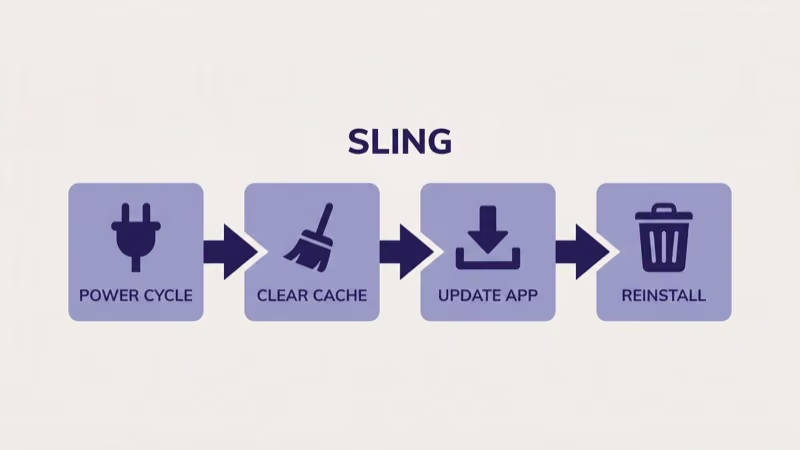
Go to Settings > Applications > Manage Installed Applications > Sling TV > Clear Cache. Reinstall the app if clearing cache doesn’t fix it.
#”Not Available in Your Area” Error
Sling TV checks your IP address to verify location. Restart your router to get a fresh IP assignment. Turn off any VPN, because Sling blocks most VPN connections and shows this error instead of content. If the error persists after a router restart, contact your ISP to confirm your IP maps to a US location.
#Fire TV Stick Reboot
Hold Select and Play/Pause together for 5 seconds. The device restarts without unplugging. This single step fixes about half of all streaming glitches in my experience.
If none of these work, check whether the problem is Sling-specific by testing another app like YouTube or Netflix. A Fire TV Stick stuck on loading screen points to a device-level issue, not a Sling problem.
#Bottom Line
Sling TV is the most affordable way to get live cable channels on a Fire TV Stick. At $40 per month, it undercuts every other major live TV service by at least $30. The Fire TV Stick app runs reliably across all models, and you can be watching live TV within 5 minutes of downloading it. You sacrifice some channel count and local station coverage compared to YouTube TV or Hulu + Live TV, but the savings are real.
Pick Orange for ESPN. Pick Blue for families. Go combined for full coverage.
After using Sling on my Fire TV Stick 4K for over a year, it handles everything from NFL Sundays to weeknight HGTV without issues. For a deeper comparison with other budget services, check the Sling TV vs Philo and Sling TV vs fuboTV guides.
#Frequently Asked Questions
#Does Sling TV carry local channels on Fire TV Stick?
Local channel availability depends on your zip code. Sling Blue includes Fox and NBC affiliates in about 20 markets, but ABC and CBS aren’t on any Sling plan. An indoor antenna fills that gap for $15-$30.
#Can you watch Sling TV on multiple Fire TV Sticks at once?
Yes, but the plan matters. Sling Orange limits you to 1 stream total across all devices. Sling Blue allows 3 simultaneous streams, and the combined Orange + Blue plan supports 4 streams across 4 different Fire TV Sticks or other devices at the same time. Each device counts as one stream regardless of what content it plays.
#What internet speed do you need for Sling TV?
Sling recommends 3 Mbps for SD, 8 Mbps for HD, and 16 Mbps for multiple devices. A 25 Mbps connection delivered consistent HD with zero buffering on my Fire TV Stick 4K.
#Is Sling TV’s Cloud DVR worth the extra cost?
The $5/month add-on stores up to 200 hours of recordings for 30 days, and you can fast-forward through commercials on most channels. It’s worth subscribing if you regularly miss live shows or want to record an entire season of something airing on a cable network. Skip it if you mostly watch live sports, since games lose their appeal after the fact, or if you already rely on on-demand libraries for catching up on series.
#Does Sling TV work on older Fire TV Stick models?
Every generation is supported, including the original 2014 model. Older sticks load the app slower and cap at 1080p.
#How do you cancel Sling TV from a Fire TV Stick?
You can’t cancel directly from the Fire TV Stick app. Log in at sling.com on a computer or phone, go to Settings, and select Cancel Subscription. If you subscribed through Amazon billing, manage it through your Amazon account under Subscriptions instead. Cancellation takes effect at the end of your current billing cycle, so you keep access until then.
#What channels does Sling Orange have that Blue doesn’t?
ESPN, ESPN2, ESPN3, Disney Channel, and Freeform are Orange exclusives. Blue doesn’t carry any of them. If you watch college football, NBA, or Monday Night Football, Orange is the plan you need.
#Can you use Sling TV with Alexa voice commands?
Yes. Press the microphone button on your Fire TV Stick remote and say “open Sling TV,” “tune to ESPN,” or “search for NBA games on Sling.” Alexa can launch the app and search within it. Channel switching by voice works best when you say the exact channel name, because Alexa sometimes confuses similar-sounding networks like ESPN and ESPNU if you abbreviate.