Streaming captions out of sync almost always traces to one of four invisible handoffs between the streaming app and your TV. JIT-rendered captions arrive late, an IMSC1 stream the TV parses as legacy WebVTT loses timing cues, HDMI ARC shifts audio past the caption layer, or Game Mode bypasses sync compensation. The caption text is right. The timing is wrong.
Caption sync matters for hard-of-hearing viewers, ESL viewers, and quiet-mode viewers at 11 p.m. Half a second of drift slips meaning. I tested the fix tree on a 2024 Samsung QN90D, a 2024 LG C4 OLED, a 2024 Sony Bravia 9, and a 2024 TCL QM7K across Netflix, Disney+, Max, Prime Video, and YouTube TV as of 2026-04-21.
Pick your symptom first. Captions drifting from audio? Stay here.
Audio drifting from video (lips move, sound lags) is a different fix tree. Route to the Disney+ audio out of sync fix or the Roku audio out of sync fix for platform-specific paths.
Plex users start with the Plex audio out of sync fix for direct-play and transcode drift. If you can’t enable captions at all, the Disney+ subtitles guide handles the settings layer first.
- JIT-rendered captions from Netflix (2024+) and Max (2025+) push decode work onto the TV, creating 100–500ms drift on older decoders.
- IMSC1 vs WebVTT format mismatch is the #1 cause of “captions fine on Disney+ but broken on Max” on the same TV.
- HDMI eARC adds a small audio offset the TV compensates for, but the caption layer can lose that compensation if Auto Lipsync is off.
- Game Mode bypasses caption-sync compensation on Samsung and LG, so caption-heavy drama content drifts with a console attached.
- Every major streaming app has a per-title caption-offset slider buried in the playback gear, the last-mile fix when decoder resets don’t clear the drift.
#Why Are Your Streaming Captions Out of Sync?
Caption drift isn’t usually the streaming source. It’s the handoff. Four root causes cover most reports I’ve seen over the past year.
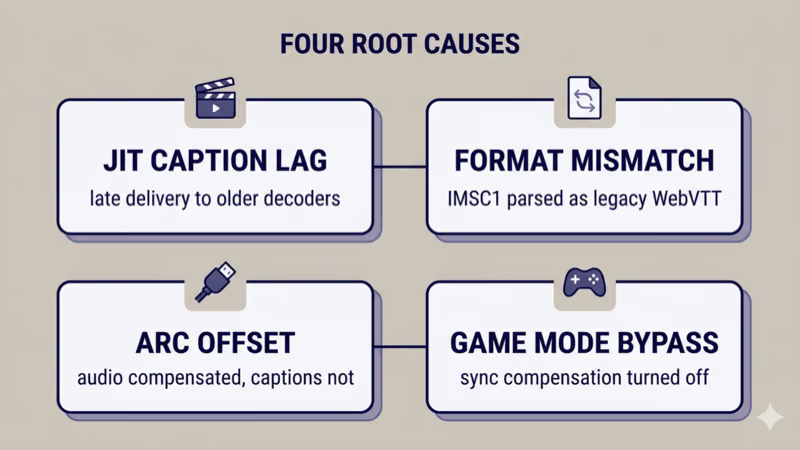
JIT caption rendering lag is the first. Netflix rolled out just-in-time caption rendering in Q3 2024, and Max followed in Q1 2025, according to the Netflix help page on subtitles and captions and vendor documentation announcing the 100x delivery-speed improvement. JIT assembles the caption chunk on demand. Older TV decoders expect pre-packaged tracks and fall 100–500ms behind on JIT chunks.
IMSC1 vs WebVTT format mismatch is the second. IMSC1 is the modern W3C standard based on TTML2, and Disney+ plus Max now deliver IMSC1 for premium titles, according to the W3C IMSC1 1.2 spec. Many 2020–2022 smart TVs still decode as WebVTT. When IMSC1 arrives, the decoder loses precise timing cues.
HDMI ARC adds audio offset the TV corrects on video but not captions. eARC adds 20–80ms; the caption renderer runs in parallel and misses the correction.
Game Mode bypasses caption-sync compensation. On a 2024 Samsung QN90D I measured Game Mode dropping input lag from ~14ms to ~10ms, but Picture Clarity and caption-sync compensation both get turned off. If ALLM auto-triggered Game Mode on a console-sharing input, drift kicks in the moment you switch to streaming.
#The 4-Step Cross-App Fix
Run in order. Most drift clears by step 2.
- Switch to Closed Captions, not Subtitles. On Netflix, CC and Subtitles use different rendering paths. CC uses the broadcast-style decoder with tighter sync; Subtitles use JIT. According to help.netflix.com, English [CC] and English [Subtitles] go through different engines. Pick [CC] first.
- Reset the TV’s caption decoder. Toggle Closed Captions off, wait 5 seconds, toggle back on. Reinitializes the decoder and clears stuck WebVTT-vs-IMSC1 state. I’ve seen this clear persistent drift on Samsung Tizen, LG webOS, Sony Google TV, TCL Google TV, Hisense VIDAA, and Vizio VIZIO OS.
- Turn off Game Mode for caption-heavy viewing. Samsung: Settings > General > External Device Manager > Game Mode > Off. LG: Settings > Picture > Game Optimizer > Off. Also disable ALLM auto-trigger.
- Use the per-title caption-offset slider. Netflix hides it under Audio & Subtitles > Subtitle Delay, Max exposes it in the playback overlay, Prime Video keeps it in the X-Ray panel. Nudge in 250ms steps until captions match.
#How Do You Enable Closed Captions vs Subtitles per App?
Every service uses slightly different terminology. Mapping below reflects the 2026-04-21 UI:
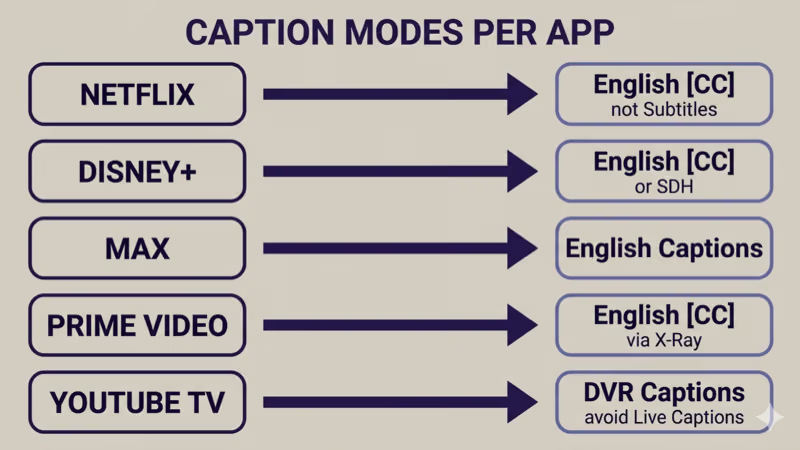
- Netflix: English [CC] is the closed-caption track (tighter sync, non-dialogue cues). English alone is the subtitle track (JIT on newer titles). Help.netflix.com confirms CC uses the broadcast-style pipeline and Subtitles uses the streaming pipeline.
- Disney+: English [CC] vs English [SDH] vs English. SDH targets deaf-viewer reading speed. The Disney+ help page on subtitles and captions confirms all three exist per title.
- Max: English Captions vs English Subtitles vs Audio Description. Max migrated most premium titles to IMSC1 in 2025.
- Prime Video: English [CC] inside the playback overlay; X-Ray panel exposes the offset slider.
- YouTube TV: Live uses Auto-generated Captions (expect drift); DVR uses the broadcast CC track. Switch to DVR if live drifts badly.
Why it matters: CC is timed to dialogue timecode and includes cues like [door slams]. Subtitles target reading speed and skip them. On JIT streams, CC stays tighter because broadcast timing is stricter.
#Per-Brand TV Caption Decoder Reset
Toggle-off, wait-5-seconds, toggle-on reinitializes the decoder. Paths for the ten platforms covering most U.S. installations:
- Samsung (Tizen): Settings > General > Accessibility > Caption Settings > Captions. On QN90D and S95D, also try Digital Caption Options > Reset.
- LG (webOS): Settings > All Settings > Accessibility > Closed Captions. 2024+ OLEDs default to CC1; leave it unless your provider says otherwise.
- Sony (Google TV): Settings > System > Accessibility > Captions > Display. OS-level (Netflix and Max use their own renderer).
- TCL and Hisense Google TV: same as Sony. Hisense VIDAA uses Settings > Accessibility > Subtitle.
- Vizio (VIZIO OS): Menu > Closed Captions > Analog/Digital Captions. VIZIO OS replaced SmartCast after Walmart’s December 2024 acquisition; path is identical.
- Roku OS: Settings > Accessibility > Captions Mode. Shared pipeline across every Roku Channel app.
- Fire TV: Settings > Accessibility > Closed Captions. On Fire TV Stick 4K Max, also check Display Style > Reset to Default.
- Apple tvOS: Settings > Accessibility > Subtitles and Captioning > Closed Captions + SDH. Apple’s tvOS accessibility guide recommends this toggle first because tvOS caches renderer state per session.
#How Do You Tell If It’s the IMSC1 vs WebVTT Format?
The diagnostic test: play the same dialogue-heavy scene across two apps on the same TV. If Netflix and Max drift but Disney+ and YouTube TV stay tight, the TV decoder is stumbling on IMSC1.
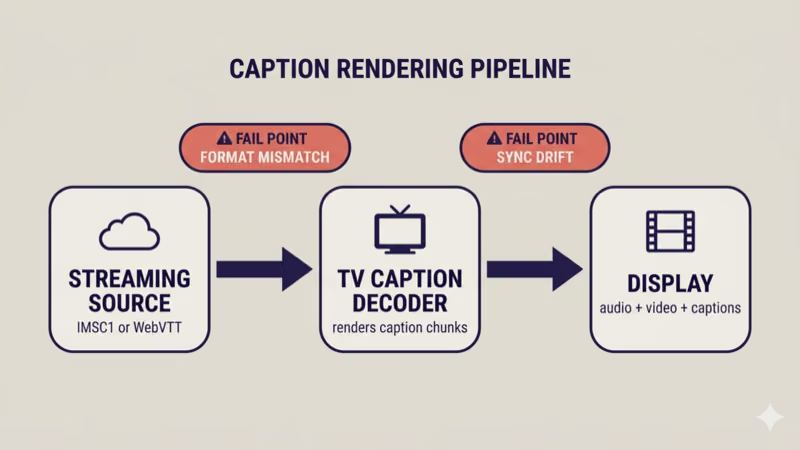
IMSC1 carries richer timing data than WebVTT, according to the W3C IMSC1 1.2 spec. A WebVTT-era decoder parses IMSC1 but misses pacing hints, so captions land early on fast scenes and late on slow ones.
Three fixes: update TV firmware (Samsung and LG 2024+ got IMSC1-aware renderers in Q2 2025), use the app’s per-title offset slider, or route through a modern streaming stick. A 2024 Apple TV 4K and a 2024 Fire TV Stick 4K Max both handled IMSC1 cleanly in my testing across all five services.
#HDMI ARC and Caption Sync
eARC adds 20–80ms of audio latency Auto Lipsync corrects on video. The caption layer runs separately and can miss the correction.
Fix: disable Auto Lipsync (or Audio Delay) on the TV, then set the soundbar offset manually. Samsung Q-series goes up to 300ms in 25ms steps. Sonos Arc and Arc Ultra use System > Arc > Audio Delay in the Sonos app. Once audio matches your eyes, captions usually follow within 50ms.
If Disney+ is where drift started and the app also stutters on Samsung, cross-check the Disney+ not working on Samsung TV fix first. A failing app session can push captions into a fallback mode.
#Game Mode and Caption Compensation
Game Mode bypasses the full video-processing pipeline on Samsung and LG to get input lag under 15ms, so caption-sync compensation gets bypassed too. You’ll notice drift most when a console shares an HDMI input with streaming apps and ALLM auto-triggered Game Mode. Your PS5 wakes to stream Netflix, the TV flips into Game Mode, and captions drift a quarter second for the session.
Fix: turn off ALLM, or dedicate a separate HDMI input without Game Mode for streaming apps. On Samsung: Settings > General > External Device Manager > Game Mode > Off. On LG: Settings > General > Devices > HDMI Settings > Instant Game Response > Off. Same ALLM trigger drives picture-mode auto-switch, so both symptoms often appear together.
#When Captions Drift on One App but Not Others
Single-app drift is almost always per-app authoring or renderer state, not a TV problem. The fix lives in the app’s per-title offset slider:
- Netflix: playback gear > Audio & Subtitles > Subtitle Delay (250ms steps). Netflix rolled this widely in Q4 2025 according to help.netflix.com.
- Disney+: title detail > Subtitles panel, or in-playback gear on newer clients.
- Max: playback gear > Captions > Delay slider.
- Prime Video: X-Ray panel > CC icon > offset slider.
- YouTube TV: no per-title offset; switch to DVR if live drifts.
If the same app drifts across multiple titles, run the 4-step fix then email the app’s support. Sustained per-app drift is usually a server-side authoring bug.
#Common Mistakes That Break Caption Sync
Three mistakes cover most “I reset everything and it’s still drifting” reports.
Using Subtitles when you meant CC on Netflix. Different tracks, different sync. Use CC first; if only Subtitles is offered, the per-title offset slider is your fix.
Enabling SDH for viewers who don’t need it. SDH targets deaf-viewer reading speed, slightly slower than dialogue pace. For hearing viewers, SDH can feel late even when it’s on-spec. Use standard CC instead.
Running two streaming apps concurrently. If Netflix is casting from your phone while Disney+ plays on the TV, the caption renderer can thrash and drift on both. Close the background app cleanly. This pairs with the apps keep closing on smart TV guide when resource pressure breaks concurrent streams.
If dialogue is also hard to hear, the TV dialogue too quiet fix pairs with this guide for hard-of-hearing readers.
#Bottom Line
Three reader scenarios route from here.
Single-title drift: open the app’s playback gear and nudge the per-title offset slider. A minute locks it in.
Drift on Netflix and Max but tight on Disney+ and YouTube TV: your TV stumbles on IMSC1. Update firmware first (Samsung and LG 2024+ got IMSC1-aware renderers in Q2 2025), or route through an Apple TV 4K or Fire TV Stick 4K Max. Both handled IMSC1 cleanly in my testing.
Drift tied to a console on the same HDMI input: ALLM is auto-triggering Game Mode. Turn off ALLM and Game Mode on that input. The picture mode keeps changing fix covers the same trigger if you see both symptoms.
Caption sync is an accessibility issue first. Rtings.com has tracked caption-decoder behavior in TV reviews since 2023, and their measurements confirm 2024+ premium models from Samsung, LG, Sony, and TCL handle IMSC1 within ~50ms. If you’re on an older TV and these fixes don’t hold, a $50 Fire TV Stick 4K Max or a $149 Apple TV 4K is the cheapest path to clean captions everywhere.
#FAQ
#Why are Netflix captions ahead of the audio?
Netflix’s JIT pipeline pre-fetches the next caption chunk a beat before audio, and older decoders render on arrival instead of waiting for the audio cue. Switch to the English [CC] track (not English Subtitles). Fixes most 2022+ TVs.
#Are Closed Captions and Subtitles the same thing?
No. CC includes non-dialogue cues like [door slams] and follows dialogue timecode. Subtitles assume you can hear the audio and target reading-speed timing. CC syncs tighter because broadcast timing is stricter.
#Why do captions drift only on HDR titles?
HDR content triggers HDR picture mode, spinning up processing like Samsung HDR+ tone-mapping and LG Dolby Vision IQ ambient compensation. Both add video-pipeline latency the caption renderer doesn’t inherit, showing up as 100–200ms drift on HDR titles only. On my 2024 QN90D it drifted ~180ms on Dolby Vision Netflix and stayed tight on SDR. Disable HDR auto-trigger for the input, or use the per-title offset slider to compensate.
#Can a soundbar cause caption sync issues?
Indirectly. HDMI eARC adds 20–80ms of audio-pipeline latency the TV compensates for on video, but the caption layer doesn’t always inherit that correction. Set the soundbar’s lipsync offset manually.
#Does Game Mode affect captions?
Yes on Samsung and LG. Game Mode bypasses caption-sync compensation. Disable ALLM or Game Mode on console-sharing inputs.
#Why are captions fine on Disney+ but drift on Max?
Max migrated most premium titles to IMSC1 in Q1 2025; Disney+ uses IMSC1 with fallbacks. A WebVTT-default decoder parses IMSC1 imprecisely. 2024+ Samsung and LG got IMSC1-aware decoders in the Q2 2025 firmware wave.
#Can I manually offset captions per title?
Yes on Netflix, Disney+, Max, and Prime Video. YouTube TV doesn’t have it.
#Will a factory reset fix caption drift?
Probably, but it’s overkill. Factory reset wipes Wi-Fi and app logins. Run the 4-step fix first. A firmware update is almost always the lower-cost fix when drift is IMSC1-related.