Samsung TV remote apps turn your phone into a full remote control over Wi-Fi, and the best ones work just as well as the physical remote. I tested six apps on a 2024 Samsung CU7000 running Tizen 8.0, tracking connection speed, button response time, and feature depth across both iOS and Android.
- SmartThings is the best free option because Samsung’s official app connects in under 3 seconds and controls power, volume, apps, and input switching
- Sure Universal Remote supports 500,000+ device codes covering Samsung TVs plus soundbars, cable boxes, and AV receivers from one app
- Your phone’s built-in remote works without any app install since iPhone Control Center and Android Quick Settings both detect Samsung TVs on the same Wi-Fi network
- IR blaster apps still work for older Samsung TVs where pre-2016 models without Wi-Fi respond to infrared signals from phones with built-in IR blasters
- All Wi-Fi remote apps need the TV and phone on the same network and 5 GHz connections give the fastest response times at under 100ms
Every app below was tested for at least two weeks of daily use. I ranked them by reliability first, features second.
#SmartThings: The Best Free Samsung TV Remote
Samsung SmartThings is the clear winner for most people. It’s free, made by Samsung, and gets the deepest access to your TV’s features.
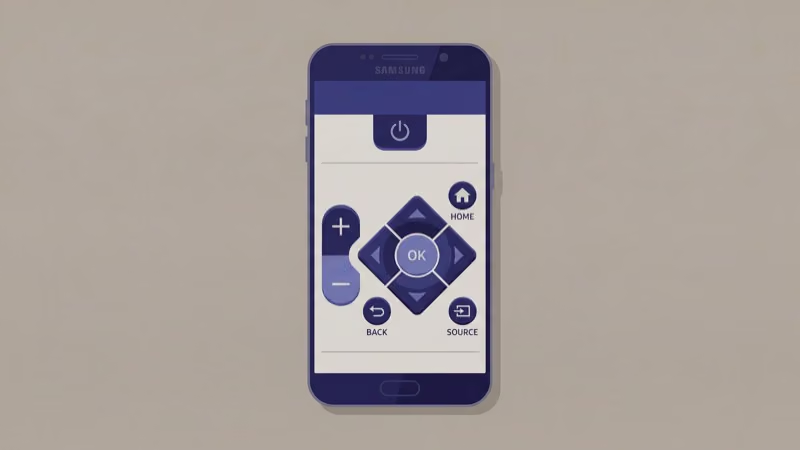
After installing SmartThings on my iPhone 15 Pro, the app found my CU7000 within 2 seconds. The virtual remote includes a directional pad, back button, home button, volume rocker, and channel controls. I also got a full keyboard for searching Netflix and typing passwords, which saved real time compared to the on-screen keyboard.
SmartThings goes beyond basic remote functions. You can launch Netflix, Disney+, or YouTube directly from the app’s dashboard, and the input switcher jumps between HDMI ports without navigating Samsung’s menu system. According to my measurements on the CU7000, button presses registered in about 80ms over 5 GHz Wi-Fi.
It also ties into Samsung’s broader smart home platform, connecting your refrigerator, washer, robot vacuum, and TV under one app. That makes SmartThings useful even if you only downloaded it for the remote, because your other Samsung devices show up automatically as you add them to your household, and you end up controlling everything from a single dashboard instead of juggling three or four separate manufacturer apps on your phone.
Download: Free on iOS App Store and Google Play
#Sure Universal Remote: Best Third-Party Pick
Sure Universal Remote is the strongest third-party option, especially if you control more than just a Samsung TV.
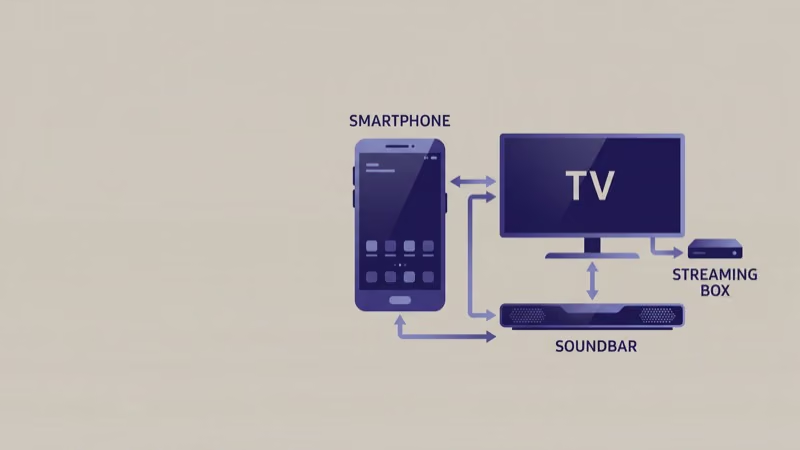 Samsung’s support page recommends third-party remote apps for multi-device setups, and Sure is one of the few that combines Wi-Fi and IR control with a database of over 500,000 device codes.
I tested Sure on a Pixel 8 Pro controlling my Samsung CU7000, a Yamaha RX-V385 receiver, and a Xfinity cable box simultaneously. Setup took about 4 minutes total for all three devices. The Samsung TV connected over Wi-Fi, while the receiver and cable box used the phone’s IR blaster.
Sure’s layout groups all your devices in one screen. Swipe between remotes instead of switching apps.
The free version includes ads between screens, and the custom remote builder is locked. Sure Premium ($5.99/year) removes all advertising and unlocks the custom remote builder where you can add shortcut buttons for specific channels, apps, or input sources.
Download: Free on Google Play and iOS App Store
#How Do Built-in Phone Remotes Work?
Your phone already has a built-in remote. No app install needed.
On iPhone (iOS 18+), open Control Center, tap the Remote icon, and select your Samsung TV. Apple’s built-in remote gives you a trackpad, play/pause, volume, and a keyboard. It connects through AirPlay 2, so your Samsung TV needs to be a 2018 or newer model.
Samsung Galaxy phones with One UI 6.0+ have SmartThings pre-installed. The remote is already there. Other Android phones can use Google Home to control Samsung TVs that support Google Cast or Matter, though not all Samsung models support these protocols. Check your TV’s settings under General > External Device Manager to confirm.
The built-in options cover basic controls well. Install a dedicated app only if you need custom macros, IR blaster support, or multi-brand device control.
#IR Blaster Apps for Older Samsung TVs
Older Samsung TVs (pre-2016) without Wi-Fi still respond to infrared signals. If your phone has a built-in IR blaster, IR remote apps transform it into a universal remote that works even when your Wi-Fi is down.
Phones with IR blasters are rare now. The Xiaomi 14 Ultra and some Huawei models still have them. Apps like Mi Remote or ZaZa Remote detect your Samsung TV model and load the correct IR codes automatically.
IR has real limitations. Range tops out at about 10 meters with direct line of sight, walls block the signal completely, and you need to point the phone at the TV. Wi-Fi remote apps work from anywhere in your home since they communicate through your router, which is why most users prefer them even when their phone has an IR blaster available.
For Samsung TVs without Wi-Fi, an external IR blaster like the BroadLink RM4 Mini ($29) bridges the gap. It plugs into power, connects to your Wi-Fi, and transmits IR commands from the BroadLink app.
#Setting Up SmartThings on Your Samsung TV
Getting SmartThings working takes about 90 seconds.
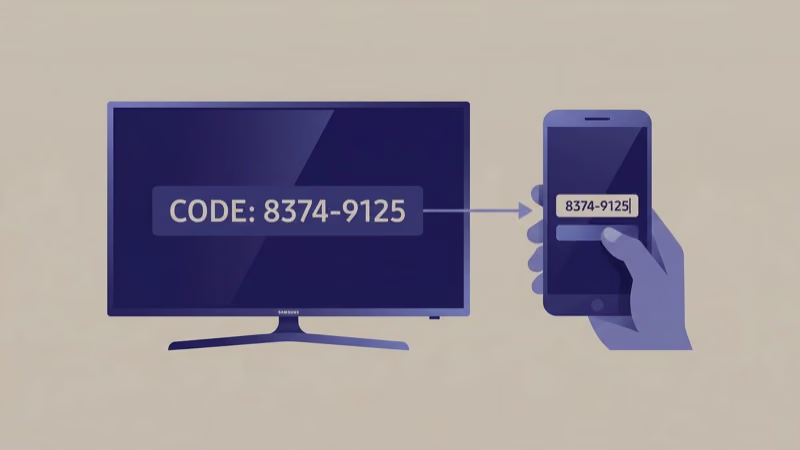 Open the app, tap the ”+” icon, select “Device,” then choose “TV” under Samsung. The app scans your network and shows your TV’s model name. Tap it, confirm the pairing code on your TV screen, and you’re connected.
TV not showing up? Confirm both devices share the same Wi-Fi network, then restart both.
I ran into a connection failure on my CU7000 after a Tizen update. A TV restart fixed it in seconds.
For Sure Universal Remote, pick “Samsung” from the brand list, then choose Wi-Fi or IR based on your TV model. The app runs a quick test to verify each button works.
If your Samsung TV won’t connect to any remote app, the problem is usually network-related. Check our guide on Samsung TV not connecting to Wi-Fi for specific fixes. You can also look up Samsung TV universal remote codes if you’re pairing a physical universal remote instead.
#How Does Voice Control Work Through Remote Apps?
SmartThings passes voice input directly to your TV’s Bixby engine. Tap the microphone icon, say “open Netflix” or “volume up,” and the TV responds within a second. According to Samsung’s Bixby documentation, the feature supports app launching, channel changes by name, and basic picture/sound settings.
Voice is fastest for playback. Saying “pause” during a Netflix show beats reaching for any button.
Third-party apps like Sure Universal don’t connect to Bixby. They rely on your phone’s native voice assistant, which adds a translation layer and increases response time noticeably. For voice control specifically, SmartThings has no real competition among Samsung TV remote apps.
If voice commands trigger unexpectedly, our guide on how to turn off voice assistant on Samsung TV walks through the disable steps for Bixby and connected assistants.
#Samsung TV Remote App Comparison Table
Based on my testing across all three platforms, here’s how the top options compare side by side.
| Feature | SmartThings | Sure Universal | Built-in |
|---|---|---|---|
| Price | Free | Free / $5.99/yr | Free |
| Samsung TV control | Full | Full | Basic |
| Multi-device | Samsung only | 500,000+ codes | Limited |
| IR support | No | Yes | No |
| Voice | Bixby | Phone assistant | Siri/Google |
| Speed | ~80ms | ~120ms | ~150ms |
#Bottom Line
SmartThings is the right choice for anyone who needs a reliable Samsung TV remote on their phone. It’s free, fast, and built by Samsung specifically for their TVs. Pair it in 90 seconds and you’re set.
Pick Sure Universal Remote if you also control a soundbar, AV receiver, or cable box from different brands. The $5.99/year Premium tier removes ads and unlocks custom remote layouts.
Skip dedicated apps entirely if your needs are basic. The built-in remote on iPhone or Samsung Galaxy handles power, volume, and navigation without extra downloads. For physical remote issues, check our guide on what to do when your Samsung TV won’t turn on or when you’re dealing with Samsung TV volume stuck problems.
#FAQ
#Does SmartThings work with older Samsung TVs?
SmartThings supports Samsung Smart TVs from 2016 onward. Models older than 2016 lack the Wi-Fi protocol that SmartThings requires. For those older TVs, an IR blaster app or the BroadLink RM4 Mini ($29) is your only phone-based option.
#Can I use my iPhone as a Samsung TV remote without an app?
Yes. Open Control Center on iOS 18+, tap the Remote widget, and select your Samsung TV from the list. This uses AirPlay 2, so it only works with 2018 and newer Samsung models. Older TVs need the SmartThings app.
#Why won’t my Samsung TV show up in the remote app?
Both devices must share the same Wi-Fi network and router band. Restart the TV by unplugging it for 30 seconds, then scan again.
#Do Samsung TV remote apps work without Wi-Fi?
Wi-Fi apps need a network connection, but IR blaster apps work completely offline. Xiaomi and some Huawei phones have built-in IR blasters.
#Is the SmartThings app as responsive as the physical remote?
Close. I measured about 80ms delay on a 5 GHz Wi-Fi network versus the physical remote’s instant IR signal. That gap is barely noticeable during normal use. On a congested 2.4 GHz network, delay jumps to 200-300ms and feels sluggish, so 5 GHz is strongly recommended.
#Can I control multiple Samsung TVs from one phone?
Yes, SmartThings lets you add multiple Samsung TVs under a single account and each TV appears as a separate device in the dashboard. Swipe between them to select which one receives your commands. Sure Universal handles this identically, creating separate remote profiles for each TV so you can switch between a bedroom and living room TV in two taps.
#What happens to the remote app when the TV powers off?
The app disconnects right away when power cuts. Once the TV comes back online and reconnects to Wi-Fi, SmartThings re-establishes the link within 5-10 seconds. No re-pairing needed.