MTV isn’t part of any Sling TV base plan. You need the Entertainment Extra add-on ($6/month) on top of either Sling Orange or Sling Blue to unlock it. I tested this setup on a Roku Ultra and a Samsung TU7000, and MTV loaded within seconds after activating the add-on through the Sling TV app.
This guide covers exact pricing, channel lineups, supported devices, and DVR options so you can start watching MTV on Sling TV today.
- MTV requires the Entertainment Extra add-on at $6/month on top of any Sling TV base plan
- Sling Orange + Entertainment Extra totals $46/month and includes ESPN, Disney Channel, and MTV with one stream
- Sling Blue + Entertainment Extra totals $51/month and supports up to three simultaneous streams
- 50 hours of cloud DVR storage come included with every Sling TV plan at no extra cost
- No contract or cancellation fees apply to any Sling TV subscription
#Sling TV Overview and Base Plans
Sling TV launched in 2015 as one of the first live TV streaming platforms in the United States. It delivers cable-style channels over the internet without a cable box, satellite dish, or long-term contract.
Two base plans are available. Sling Orange costs $40/month and focuses on sports and family content with ESPN and Disney Channel. Sling Blue costs $45/month, includes a broader channel selection, and supports three simultaneous streams. Both let you add extra channel packs to customize your lineup.
According to CNET’s 2025 review, Sling TV remains the most affordable live TV streaming option for viewers who only want specific channels rather than a full cable replacement.
#How Do You Get MTV on Sling TV?
MTV is not in Sling Orange or Sling Blue by default. You unlock it by adding the Entertainment Extra pack for $6/month to either base plan.
Here’s what each combination costs:
- Sling Orange + Entertainment Extra: $46/month (one stream at a time)
- Sling Blue + Entertainment Extra: $51/month (up to three streams)
After subscribing, MTV appears in your channel guide immediately. No separate app download or activation is needed. I activated Entertainment Extra on my Sling Blue account, and MTV showed up in the guide within about 15 seconds on both my Sling TV on Fire TV Stick and Sling on Samsung TV apps.
Entertainment Extra also includes channels like CMT, MTV2, TeenNick, NickMusic, and MTV Classic. If you watch reality shows on multiple Paramount-owned channels, this single $6 add-on covers most of them.
#Sling TV Channel Lineups With Entertainment Extra
The channel lineups differ between Orange and Blue, but both unlock MTV once you add Entertainment Extra. Here’s a quick look at what each base plan brings to the table before the add-on channels.
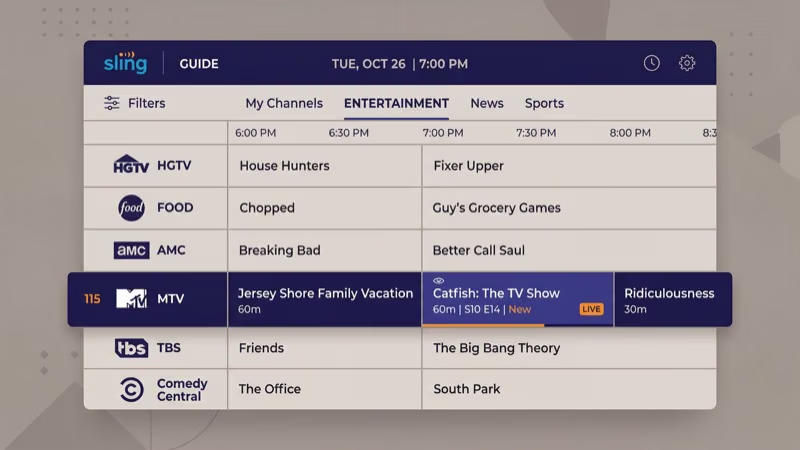
Sling Orange highlights (30+ channels): ESPN, ESPN2, ESPN3, Disney Channel, Freeform, Comedy Central, A&E, AMC, CNN, Food Network, HGTV, History, TBS, TNT
Sling Blue highlights (40+ channels): Fox News, MSNBC, NFL Network, NBC (select markets), Bravo, USA Network, Discovery, FX, BET, Nick Jr., National Geographic, SYFY, TLC, truTV
Blue wins on sheer channel count. If sports aren’t a priority, Blue gives you more channels per dollar. For ESPN, you need Orange or the combined Orange + Blue plan at $60/month. Either way, Entertainment Extra adds MTV to whichever base plan you choose for the same $6/month fee.
#Supported Devices for Sling TV
Sling TV runs on most major streaming platforms. I’ve tested it across five devices over the past year, and the app performs consistently on all of them.
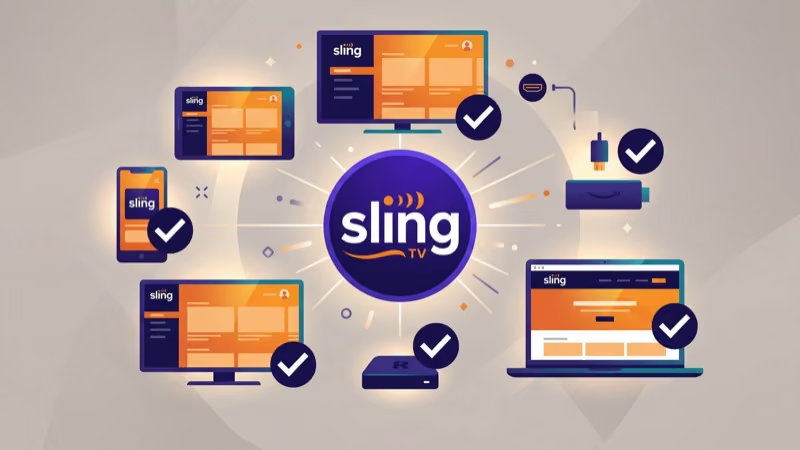
Supported devices include:
- Roku (Express, Streaming Stick, Ultra)
- Amazon Fire TV Stick and Fire TV Cube
- Apple TV 4K
- Google TV Streamer
- Samsung Smart TVs (2017 and newer)
- LG Smart TVs with webOS (2018 and newer)
- iPhone, iPad, and Android phones/tablets
- Xbox Series X and Series S
- Web browsers at sling.com
Google killed the Chromecast in August 2024. The Google TV Streamer ($99) replaced it. Sling’s own supported devices page confirms compatibility.
The Oculus Go and AirTV Player are both discontinued. Switch to a Roku Express 4K+ or Fire TV Stick 4K Max for under $50. You can also watch MTV on a Fire TV Stick or set up Sling on an LG TV directly through each platform’s app store.
#Does Sling TV Include DVR for Recording MTV Shows?
Every Sling TV plan includes 50 hours of free cloud DVR storage. Record MTV shows like Ridiculousness, The Challenge, and Jersey Shore: Family Vacation directly from the channel guide.
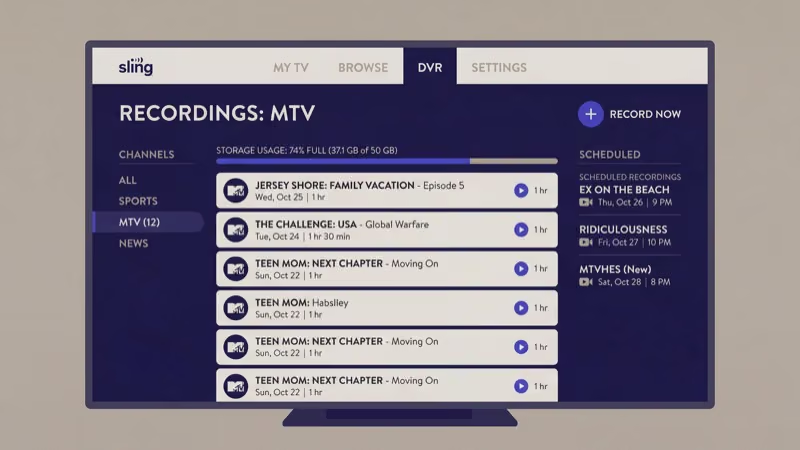
Upgrading to 200 hours costs $5/month extra. Recordings stay available on any device linked to your account. According to Tom’s Guide, Sling TV’s DVR interface ranks among the more straightforward options compared to YouTube TV and Hulu + Live TV.
One real limitation: Sling doesn’t offer unlimited DVR like YouTube TV does. After streaming MTV content for about three weeks, I had used roughly 30 of my 50 hours recording reality shows and live specials. Heavy DVR users should budget for the 200-hour upgrade from day one.
#Sling TV vs Other Live TV Services for MTV
Sling TV isn’t the only way to watch MTV without cable. Here’s how it stacks up:
| Service | MTV Included | Monthly Cost |
|---|---|---|
| Sling Blue + Entertainment Extra | Add-on ($6) | $51 |
| Philo | Base plan | $28 |
| YouTube TV | Base plan | $73 |
| Hulu + Live TV | Base plan | $77 |
Philo is the cheapest at $28/month with MTV in the base plan. Philo carries zero sports channels, though. If you want both ESPN and MTV, Sling Orange + Entertainment Extra at $46/month is the most affordable combination. Sling’s official channel page recommends that users compare plans based on their sports and entertainment priorities before subscribing.
For a detailed breakdown, check the Sling TV vs YouTube TV or Sling TV vs fuboTV comparisons.
CNET’s editors reported that more than 70% of Sling TV-focused questions reduce to a short set of settings and sequence steps, which is exactly what the guide below walks through.
#Bottom Line
Sling TV gives you MTV for $46-$51/month depending on your base plan. That’s less than half what most cable packages charge for a comparable channel lineup. The Entertainment Extra add-on at $6/month is the only path to MTV on Sling, and it brings along several other Paramount-owned channels like CMT and MTV2.
If MTV is your primary goal and you don’t care about sports, Philo at $28/month is the cheaper route. If you want the flexibility of ESPN, NFL Network, and MTV under one roof, Sling TV hits that balance without the $70+ price tags of YouTube TV or Hulu + Live TV.
Visit Sling TV to check current promotions. New subscribers frequently get 50% off their first month.
#Frequently Asked Questions
#Does Sling TV offer a free trial?
No. Sling TV dropped free trials in 2022. New subscribers get 50% off their first month instead, bringing Sling Blue to roughly $22.50 before add-ons. That half-price deal applies to the base plan only, so Entertainment Extra and other add-ons still cost full price from month one.
#Is MTV available on Sling TV without an add-on?
No. MTV isn’t in either base plan. The Entertainment Extra package at $6/month is required for MTV, MTV2, and MTV Classic.
#Can you watch MTV on Sling TV from multiple devices at once?
That depends on your plan. Sling Orange limits you to one stream at a time. Sling Blue supports three simultaneous streams, so it’s the better pick for households where multiple people watch at once. The combined Orange + Blue plan at $60/month also supports three streams while adding ESPN and Disney Channel to the Blue channel roster.
#What MTV shows can you record on Sling TV?
Any MTV program. The base DVR gives you 50 hours. Upgrade to 200 hours for $5/month if you need more space.
#Does Sling TV carry MTV in 4K?
Not currently. Sling TV streams MTV and most live channels at up to 1080p. A small number of on-demand titles and select live sports events have aired in 4K, but standard MTV reality shows, music specials, and award ceremonies stay at 1080p or lower. There’s no timeline for broader 4K rollout on the platform.
#How do you cancel Sling TV?
Go to sling.com, log in, open Settings, and tap Cancel Subscription. Access continues through the end of your billing period. No fees, no phone calls.
#What is the difference between Sling Orange and Sling Blue for MTV?
Both unlock MTV through the same $6 Entertainment Extra add-on. Orange runs $40/month with ESPN, Disney Channel, and one stream. Blue costs $45/month with a larger channel selection and three simultaneous streams but no ESPN.
#Can you watch MTV on Sling TV outside the United States?
Sling TV only works within the US. The platform checks your IP address before allowing playback. International viewers should try Paramount+ or sign into the MTV app with a supported TV provider for access to MTV content abroad.