Samsung TV Plus ships pre-installed on every Samsung Smart TV made since 2016. You open it, pick a channel, and watch for free. No login, no credit card, no subscription tier to choose from.
- Free with no account required: open the app and start watching on any 2016 or newer Samsung Smart TV
- Hundreds of live channels covering news, sports, entertainment, kids, and lifestyle content
- On-demand library included with movies and older TV series alongside the live lineup
- Available in over 20 countries, with the US offering the largest channel selection
- Ad-supported model with commercial breaks shorter than traditional cable TV
#Samsung TV Plus Overview
Samsung TV Plus is Samsung’s free ad-supported television service, often called a FAST platform (Free Ad-Supported Streaming Television). It launched in 2015. Today it runs on Samsung Smart TVs, Galaxy phones and tablets, and in US web browsers at SamsungTVPlus.com. According to CNET’s overview of FAST services, Samsung TV Plus is one of the oldest manufacturer-built free streaming platforms still active.
It’s free.
The service streams live channels around the clock and offers an on-demand library of movies and older TV series. Content partners include established media brands across news, sports, and entertainment categories. Every few minutes during playback, you see a short commercial break. That’s the trade-off for watching at no charge.
After streaming Samsung TV Plus on a 2023 Samsung QN85B for several months: ad breaks run two to three minutes, spaced out, not clustered. Manageable.
#How Does Samsung TV Plus Work?
Samsung TV Plus streams content over your home internet connection. Channel operators and on-demand distributors supply programming in exchange for a share of ad revenue. Samsung handles the platform, the app interface, and the advertiser relationships. No credit card required.
Open the app. Pick something. Watch it.
There’s no account creation required for the basic experience. On a Samsung Smart TV, the app sits in the home screen dock. On a Galaxy phone or tablet, download the app from the Google Play Store.
It looks like a cable TV grid. Scroll left and right, see what’s on now, see what’s coming up.
After using the guide on both the TV and the phone app for a couple of months, I find the TV interface significantly more polished. The phone app loads noticeably slower and the navigation feels less intuitive.
No Samsung account is required to watch. Signing in unlocks persistent watch history and profile settings that sync across devices.
#What Can You Watch on Samsung TV Plus?
The live lineup spans several content categories. News includes channels from major broadcast networks. Sports has dedicated channels running game highlights, studio analysis, and niche content from various leagues.
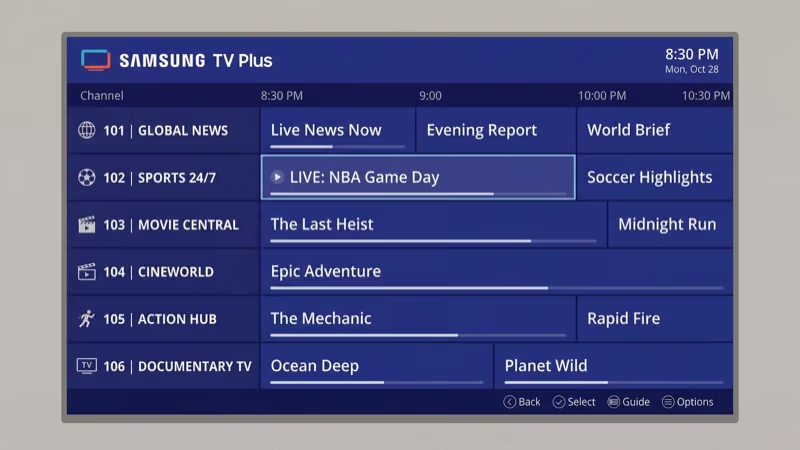
Entertainment covers classic TV networks, reality channels, and movie-focused streams. Kids programming runs on dedicated channels with familiar brand names. Lifestyle content covers cooking, home improvement, and travel. Most lifestyle channels run on a programmed loop, so if you miss the start of a program, it’ll cycle around again within a few hours.
Channel availability shifts frequently. Samsung adds and removes partners regularly. I’d recommend browsing the guide directly on your device rather than relying on any published channel list, since those go stale quickly.
On-demand content skews toward older catalog titles rather than current theatrical releases. You’ll find recognizable movie titles from the past two or three decades plus older TV series you can binge watch. Offerings rotate regularly.
Samsung also runs several proprietary branded channels with curated content including cooking shows, travel documentaries, and general entertainment programming. These are exclusive to Samsung TV Plus and tend to run continuously like traditional broadcast channels, with content repeating on a set schedule rather than being available on-demand. They’re a nice addition when nothing else catches your attention.
#Supported Devices and Setup
Support is limited to Samsung hardware. That’s the key limitation compared to competitors like Pluto TV or Tubi, which run on nearly every streaming platform.
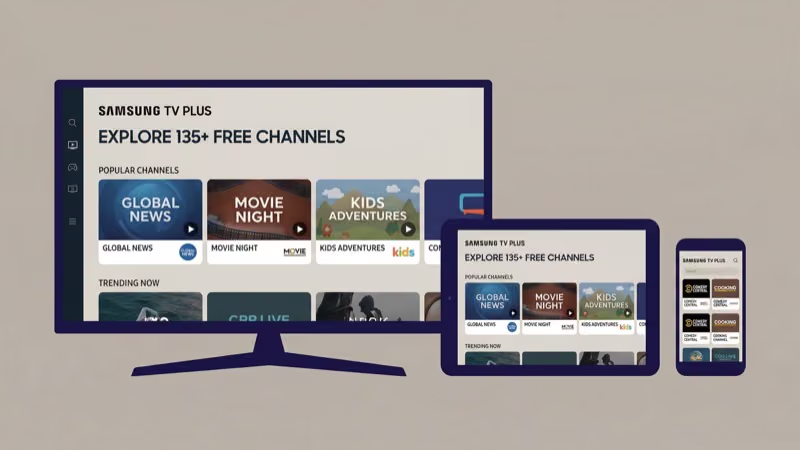
Supported devices include:
- Samsung Smart TVs from 2016 and newer (Tizen OS)
- Samsung Galaxy phones and tablets (Android 8.0 or higher)
- Web browsers at SamsungTVPlus.com (US users only)
Samsung Family Hub refrigerators with screens also support the service in the US and South Korea.
If you want to watch on a non-Samsung TV, you can cast Samsung TV Plus to a Roku player from a compatible Galaxy phone using screen mirroring. That’s the workaround, not a native integration. You can also mirror to any TV with Chromecast built-in or cast to a Google TV Streamer ($99).
Setup is instant on any modern Samsung Smart TV. The app is already in the home screen row. First launch offers a quick personalization prompt, then you’re watching.
Older Samsung TVs running Tizen 3.0 or earlier may need a firmware update before the app appears. Go to Settings, Support, Software Update, and Update Now to pull the latest firmware.
If you run into the service freezing or channels failing to load, see our guide to fixing Samsung TV Plus not working for step-by-step troubleshooting. Clearing the app cache also resolves most playback errors on older models. The guide at clearing the cache on your Samsung TV walks through the exact menu path.
#Samsung TV Plus vs Pluto TV and Tubi
Samsung TV Plus belongs to the same category as Pluto TV and Tubi: free, ad-supported streaming with no subscription. The core difference comes down to where you can watch it.
Pluto TV and Tubi run on Roku, Fire TV, Apple TV, LG TVs, Vizio SmartCast TVs, Android TVs, iOS, and Android phones. Samsung TV Plus only runs on Samsung hardware. If your household has a mix of devices, that device-exclusivity gap is significant. Pluto TV and Tubi reach every screen; Samsung TV Plus stays only on Samsung ones.
According to Samsung’s TV Plus channel documentation, the service focuses on a curated selection of channels rather than volume. Pluto TV historically runs a much larger live channel catalog. Tubi leans more heavily into on-demand movies and shows with minimal live content. Samsung TV Plus sits in the middle.
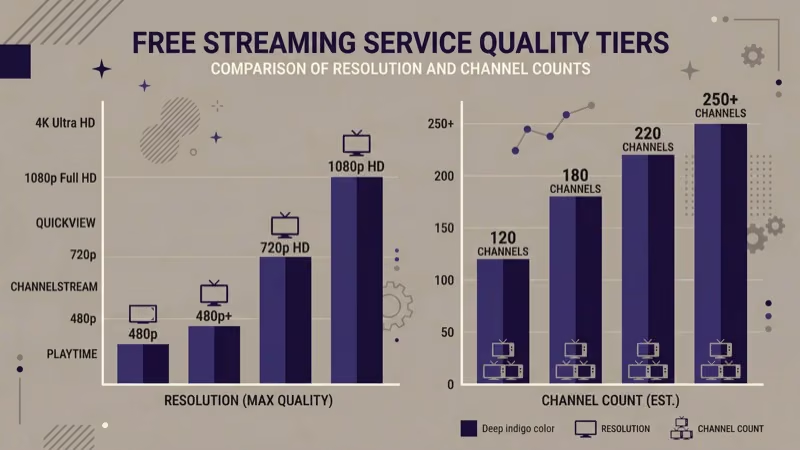
4K is where Samsung TV Plus pulls ahead. Some channels and on-demand titles support 4K with HDR. Pluto TV and Tubi don’t.
According to Samsung’s support documentation, you need at least 4 Mbps for standard definition playback. In practice, 4K content on the QN85B loaded instantly on a 100 Mbps connection with no buffering during a 90-minute movie session.
For a full breakdown of the differences, the Samsung TV Plus vs Pluto TV comparison covers both services in detail. If you’re looking at broader FAST alternatives including Peacock Free, Plex, and others, Pluto TV alternatives covers the full list.
#Tips for Getting the Most from Samsung TV Plus
Create a profile. Samsung TV Plus supports multiple user profiles on a shared TV. Each profile gets its own watch history, channel favorites, and personalized recommendations. Without separate profiles, one household member’s binge-watching will dominate the suggestions for everyone. I set up separate profiles for two viewers on the QN85B and the recommendations for each stayed cleanly separate.
Use the watchlist. Set it.
Handle ads by channel surfing. Samsung TV Plus doesn’t let you skip ads on live channels. You can flip to another channel during a commercial break and come back. The guide shows progress for live programs, so returning at roughly the right spot is straightforward.
Check the on-demand section before settling into a live channel. If you want to watch a specific movie, it may be available on-demand. The on-demand version sometimes loads with only a pre-roll ad rather than the full break pattern of the live version. Worth checking first.
For a broader look at how free streaming compares with paid options, Tubi TV review covers another major FAST service worth bookmarking.
Samsung’s official TV Plus page states that the service now offers over 250 free live channels in the US alone, a large jump from the roughly 200-channel global lineup at launch in 2015, which helps explain why the app is now preloaded on every 2016-or-later Samsung Smart TV.
#Bottom Line
Samsung TV Plus is a legitimate free TV service for people who own Samsung hardware. If you have a Samsung Smart TV from 2016 or later, it’s already installed and costs nothing to use. The live channel lineup covers the major content categories, the on-demand library fills gaps between programming, and the ad load is manageable.
The primary limitation is reach. Pluto TV and Tubi work across Roku, Fire TV, Apple TV, and Android devices. Samsung TV Plus stays within Samsung’s ecosystem. If your household is all-Samsung, that’s not a problem.
It’s worth opening once.
#FAQ
#Do I need a Samsung account to use Samsung TV Plus?
No. You can watch channels and on-demand content without logging in. Creating a Samsung account unlocks watchlists, personalized recommendations, and synced watch history across devices. It’s optional.
#Does Samsung TV Plus work on non-Samsung TVs?
Not natively. The app only runs on Samsung hardware. You can cast from a Samsung Galaxy phone to a TV using screen mirroring, but the service doesn’t have dedicated apps for Roku, Fire TV, Apple TV, or non-Samsung smart TV platforms.
#How many ads does Samsung TV Plus show?
Live channels run ad breaks roughly every 15 to 20 minutes. Each break lasts two to three minutes.
#Does Samsung TV Plus offer 4K streaming?
Select channels and on-demand titles support 4K resolution and HDR on compatible Samsung TVs. Not every channel streams in 4K. Whether 4K is available depends on the specific channel or title you’re watching and the display capabilities of your Samsung TV. Older Samsung Smart TVs from 2016 to 2018 typically cap at 1080p even if the channel supports 4K.
#Is Samsung TV Plus available outside the United States?
Yes, the service operates in over 20 countries including Canada, the United Kingdom, Germany, France, Australia, and South Korea. Channel lineups and on-demand libraries differ by region. The US service has the largest selection.
#What should I do if Samsung TV Plus stops working?
Start with a power cycle: unplug the TV for 30 seconds and restart. If channels still fail to load, go to Settings, Apps, find Samsung TV Plus, and clear the app cache. A step-by-step guide to Samsung TV Plus not working covers the most common failure scenarios including network errors and app crashes.
#Can I watch Samsung TV Plus on my phone or tablet?
Yes, on any Samsung Galaxy device running Android 8.0 or higher. Download the app from the Google Play Store.
#Does Samsung TV Plus have live sports?
Yes, the sports category includes channels with live and near-live sports content, game highlights, and analysis programs. Coverage focuses on the channels Samsung has content partnerships with rather than major live sports rights, so you won’t find NFL or NBA live games here.