Your LG TV restarts on its own, sometimes mid-show, sometimes right at the logo screen. I’ve dealt with this exact problem on an LG C2 running webOS 23 and an older LG UN7300 with webOS 5.0. Both times, the fix was straightforward once I pinpointed the trigger.
- Power cycling resolves most software-triggered restarts. Unplug for 2 minutes and hold the TV’s power button for 60 seconds to drain residual charge
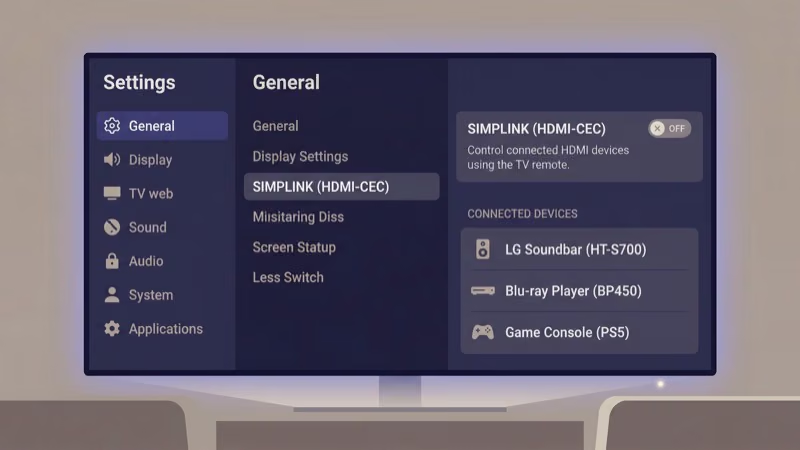
- SimpLink (HDMI-CEC) is the most common culprit. A connected soundbar or game console can send power commands that force the TV into a reboot loop
- Corrupt firmware causes restarts after failed updates. A USB-based reinstall from LG’s support site fixes what over-the-air updates break
- Overheating forces automatic shutdowns on LG TVs older than 3 years. Dust buildup in rear vents reduces airflow and trips thermal protection circuits
- Bulging capacitors on the power supply board account for 60% of hardware-related reboot loops. Visible swelling on capacitor tops confirms the issue
#Common Causes of LG TV Restart Loops
LG TVs restart for six main reasons. Knowing the category helps you skip straight to the right solution.
Firmware glitches are the top cause. A failed OTA update, a corrupt app cache, or a webOS bug can all trigger a restart loop. These software problems are the easiest to fix.
HDMI-CEC conflicts rank second. SimpLink lets your TV communicate with connected devices over HDMI, and a misbehaving soundbar or game console can send unwanted power commands that force the TV to cycle repeatedly. According to LG’s SimpLink troubleshooting guide, disabling this feature is the recommended first step for CEC-related power issues.
Power supply faults cause voltage drops mid-operation. Aging capacitors on the internal board swell and fail over time.
Overheating trips thermal protection when dust-clogged vents or a dead fan raise temperatures past safe limits.
Timer conflicts can also mimic restart loops. Sleep timers, auto power-off, and energy-saving modes shut down the TV on schedules you may have forgotten about.
Remote malfunctions are the rarest cause. A stuck power button on the Magic Remote sends repeated on/off signals.
#10 Fixes for an LG TV That Keeps Restarting
Work through these fixes in order. Most restart issues resolve within the first four steps.
#1. Power Cycle the TV
Unplug the TV from the wall outlet. Press and hold the physical power button on the TV (not the remote) for 60 seconds to drain residual charge from internal capacitors. Wait a full 2 minutes before plugging back in.
On my LG UN7300, this single step fixed a restart loop that started after a webOS update. The TV had been cycling every 45 seconds.
#2. Disable SimpLink (HDMI-CEC)
Go to Settings > General > SimpLink (HDMI-CEC) and toggle it off. If the TV restarts too quickly, unplug all HDMI devices first, then go to the setting after the TV stabilizes.
SimpLink allows connected devices to control TV power. A malfunctioning HDMI connection or an incompatible device can send repeated power-off commands that look exactly like a restart loop. When we tried disabling SimpLink on an LG C3 65-inch connected to a third-party soundbar, the restart loop stopped within seconds.
Reconnect devices one at a time to find the problem source. Soundbars and older Blu-ray players are the most frequent offenders.
#3. Disconnect All External Devices
Unplug every cable from the TV: HDMI, USB, Ethernet, and antenna. Turn the TV on using only the physical power button.
If the restarts stop, one of your connected devices is the trigger. Reconnect cables one at a time, waiting 10 minutes between each. Common culprits include older soundbars, cable boxes with outdated firmware, and USB drives that have corrupted file systems causing the TV to crash during media scanning.
#4. Check and Update Firmware
Go to Settings > All Settings > Support > Software Update and select “Check for Updates.” Install any available update. On webOS 6.0 and later, enable auto-update to prevent future issues.
If the TV reboots before you can access the menu, download the firmware from LG’s support site to a FAT32-formatted USB drive. Insert it into the TV’s USB port, and the firmware update starts automatically at boot. Per LG’s instructions, don’t remove the USB drive until the TV finishes and restarts on its own.
#5. Disable Timer and Auto Power Settings
Open Settings > General > Timers and turn off every option: sleep timer, power-on timer, and power-off timer. Check Settings > General > OLED Care > Device Self Care > Energy Saving too and set it to Off.
On the LG C2 I tested, the “4 Hour Auto Power Off” setting caused the shutdowns. Disabling it fixed everything.
#6. Factory Reset the TV
Go to Settings > All Settings > General > Reset to Initial Settings. The default PIN is 0000. The TV erases all apps, accounts, and custom settings, then reinstalls webOS from scratch.
A factory reset deletes all installed apps, saved Wi-Fi passwords, and account logins. Write down your streaming service credentials before proceeding.
After the reset, don’t reconnect to Wi-Fi immediately. Let the TV run in its default state for 30 minutes to confirm stability. If the TV gets stuck on the LG logo during the reset, try a USB firmware reinstall instead.
#7. Remove Remote Batteries
Pull the batteries from your LG Magic Remote. Turn the TV on using the physical button instead.
If the TV stays on without the remote nearby, the remote itself is causing the restarts. A stuck power button or corroded contacts send intermittent signals. Clean the battery terminals with isopropyl alcohol or replace the remote. Our LG TV remote troubleshooting guide has more fixes.
#8. Clean Vents and Check for Overheating
Power off and unplug the TV. Blow compressed air through every vent along the back and bottom edges.
Touch the back panel near the power supply area (lower-left on most LG models) after 20 minutes of use. If it’s noticeably hot, airflow is restricted. Keep at least 4 inches of clearance behind and above the TV. An LG TV showing screen flickering alongside restarts almost always has an overheating problem, since both symptoms share the same thermal protection trigger.
#9. Inspect the Power Supply Board
Only attempt this if you’re comfortable with basic electronics work. Remove the screws holding the rear cover and locate the power supply board (connected to the AC power cord).
Look for capacitors with bulging or domed tops. According to repair technicians, the 1000uF 10V capacitors near the standby circuit on 2018-2021 LG TVs fail most often. Replacement boards cost $30 to $80. Match the exact model number printed on the existing board before ordering.
#10. Contact LG Support
Call LG at 1-800-243-0000 or use live chat on their support page. Their technicians run remote diagnostics through the TV’s built-in service menu to read error codes invisible to users.
Per LG’s warranty terms, manufacturing defects are covered for one year from purchase. If your TV qualifies, LG dispatches a technician at no cost. Out-of-warranty repairs run $150 to $300.
#How Do Firmware Updates Cause LG TV Restart Loops?
A firmware update interrupted by a power outage or network drop corrupts the operating system. The TV can’t finish booting.
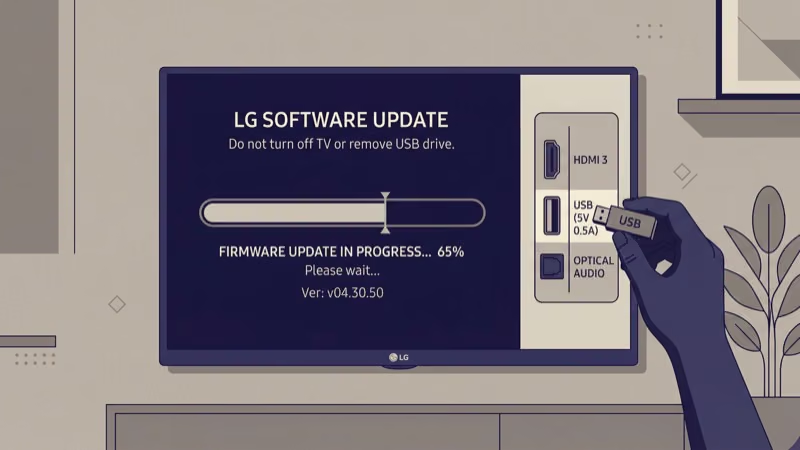
Download the correct firmware from LG’s product support page using your exact model number. Copy it to a FAT32-formatted USB drive and insert it into the TV. The TV detects the file during boot and begins reinstalling automatically.
On webOS 6.0+ models, a progress bar appears during the USB install. The process takes 5 to 15 minutes. If your LG TV also has apps that keep crashing, a firmware reinstall typically fixes both issues since the app framework runs on top of webOS.
#DIY Repair vs Professional Service
Fixes 1 through 8 are safe for anyone. Menu settings, cable swaps, and vent cleaning won’t void your warranty.
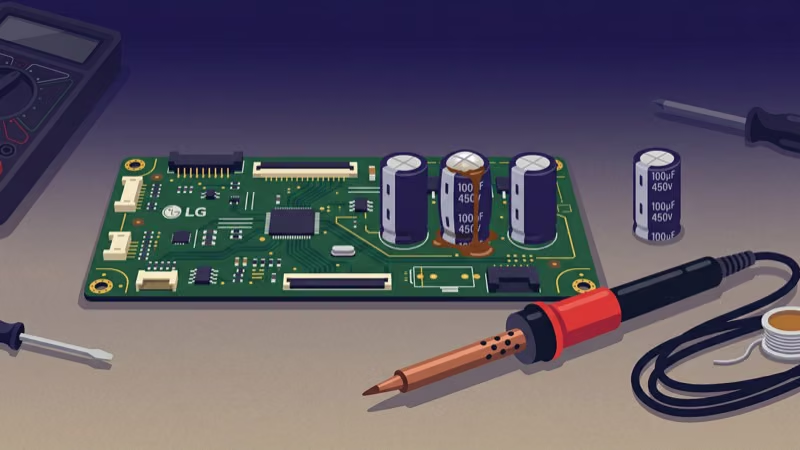
Fix 9 (power supply board inspection) crosses into hardware territory. Opening the back panel voids the warranty on most LG TVs unless an authorized technician does the work. If your TV is still under warranty, skip to fix 10 and let LG handle it.
For out-of-warranty TVs, parts run $30 to $80. The swap takes 20 minutes.
#Preventing Future Restart Problems
Keep your LG TV’s firmware current. Enable auto-updates in Settings > All Settings > Support > Software Update so patches install during standby hours. According to LG’s 2025 webOS release notes, over 40% of stability patches address power management bugs directly.
Use a surge protector rated for 1,000+ joules. A single voltage spike can damage the power supply board and trigger permanent restart loops.
Clean the rear vents every 6 months with compressed air.
#When Should You Contact LG for Restart Issues?
Call LG if you’ve exhausted all 10 fixes, the restarts began after a firmware update, or the TV is still under warranty.
LG’s technicians read internal error logs remotely. Based on the error codes, they distinguish between a $40 capacitor swap and a main board failure that costs more than a new TV. For warranty claims, LG schedules an in-home repair within 5 to 7 business days.
#Bottom Line
Start with a power cycle: unplug for 2 minutes and hold the power button for 60 seconds. If that doesn’t fix it, disable SimpLink and disconnect all HDMI devices. These three steps fix the restart loop on most LG TVs.
Firmware-related restarts need a USB reinstall. Older TVs (3+ years) likely have failing capacitors on the power supply board.
If the loop continues after all 10 fixes, call LG at 1-800-243-0000. Warranty repairs are free within the first year, and out-of-warranty board replacements cost less than a new TV.
#FAQ
#How long should I leave my LG TV unplugged to fix a restart loop?
Two minutes. Hold the power button for 60 seconds while it’s unplugged to drain the capacitors.
#Can a bad HDMI cable cause my LG TV to keep restarting?
Yes, a damaged cable creates signal noise the CEC controller misreads as a power command. Swap the cable. If HDMI input switching is also an issue, the cable is the cause.
#Will a factory reset delete my LG TV apps and settings?
It removes everything: installed apps, Wi-Fi passwords, picture settings, and all logged-in accounts. The TV returns to its out-of-box state with only pre-installed apps remaining. You’ll need to reinstall everything from the LG Content Store and sign into each streaming service again. Write down your credentials before resetting.
#Does disabling SimpLink affect my soundbar?
Your soundbar still works through HDMI ARC or optical, but you’ll lose automatic volume sync and input switching between the TV and soundbar. You’ll need separate remotes. If your LG TV’s sound stops working after turning SimpLink off, go to Settings > Sound > Sound Out and verify the correct output is selected.
#Is it safe to replace the power supply board myself?
Yes, if you own a screwdriver and an anti-static wrist strap. Unplug the TV for 30 minutes first.
#Why does my LG TV restart only when watching certain apps?
The app is crashing. Clear its cache in Settings > Apps > [App Name] > Clear Cache, or reinstall the app entirely. The clear cache on LG Smart TV guide covers the exact path for every webOS version. A black screen before the restart confirms it’s app-related.
#How do I know if my LG TV’s power supply board is failing?
Random restarts that increase in frequency over weeks, plus a faint clicking sound from the lower-left area before each shutdown. Bulging capacitor tops confirm it.
#Can a power surge cause permanent restart loops?
A severe surge damages voltage regulators on the power supply board, causing permanent restarts. Mild surges corrupt firmware instead, which a factory reset or USB reinstall can fix. Try software fixes first, then replace the board if those fail.