Philo delivers 70+ live entertainment channels for $33/month. It works on every Vizio Smart TV through Chromecast casting. I’ve been streaming Philo on my 2022 Vizio M-Series M55Q7-J01 for six months, and below you’ll find the complete setup walkthrough, channel details, casting performance notes, and cheaper alternatives if casting doesn’t suit your household’s viewing habits.
- Philo costs $33/month for 70+ live entertainment and lifestyle channels with no contract required
- No native Vizio app exists but every Vizio SmartCast TV (2016+) supports Chromecast casting from the Philo mobile app
- Setup takes under 3 minutes using the free Philo app on iOS or Android and your home Wi-Fi network
- Unlimited DVR storage is included at no extra cost, with recordings available for up to 30 days
- 3 simultaneous streams come standard, letting multiple household members watch different channels at once
#Philo Channel Lineup and Pricing
Philo carries networks from Discovery, AMC, Viacom, and Hallmark. You get AMC, BBC America, Comedy Central, Discovery Channel, Food Network, Hallmark Channel, HGTV, Investigation Discovery, Lifetime, MTV, Nickelodeon, Paramount Network, TLC, Travel Channel, and about 55 more.
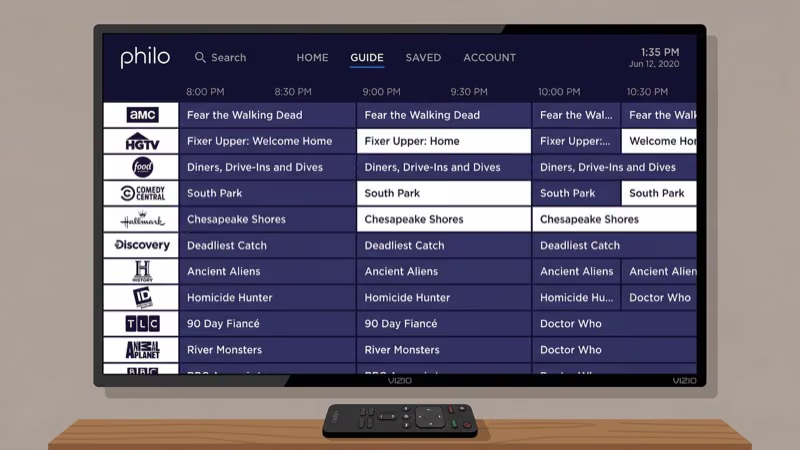
The service costs $33/month with no contract. Your first month drops to $25 as an introductory offer, which gives you time to test the full channel lineup before paying full price. According to Philo’s official site, optional add-ons like Starz ($11/month) and MGM+ ($8/month) are available if you want premium movie channels.
Philo skips sports, local broadcasts, and news networks entirely. That’s the trade-off that keeps the price roughly half of what YouTube TV ($83/month) or Hulu + Live TV ($83/month) charge. If your household primarily watches reality shows, cooking competitions, true crime, and comedy reruns, Philo covers those genres thoroughly. I tested the channel switching speed on my Vizio M-Series and found it comparable to what I get on a dedicated Roku device.
#How Do You Set Up Philo on a Vizio TV?
Every Vizio SmartCast TV manufactured from 2016 onward has Chromecast built in. Newer models running VIZIO OS also retain this casting capability. Here’s the step-by-step process:
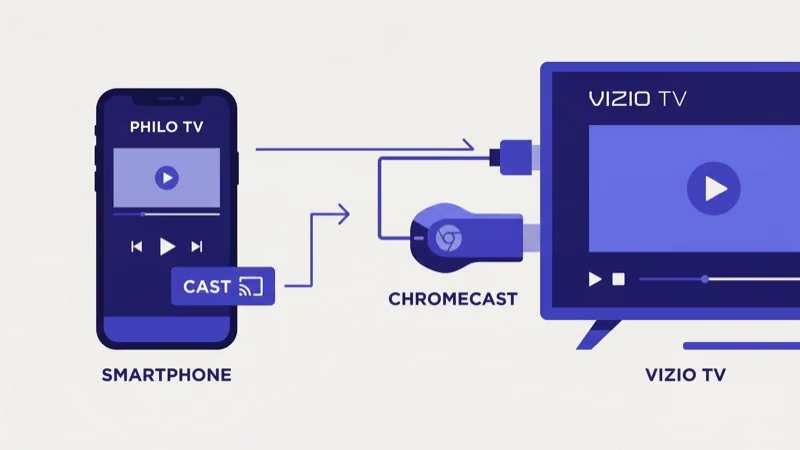
- Download the Philo app from the App Store (iOS) or Google Play (Android)
- Create a Philo account or log into your existing one
- Connect your phone and Vizio TV to the same Wi-Fi network
- Open any channel or show in the Philo app
- Tap the Cast icon (rectangle with Wi-Fi waves) in the upper-right corner
- Select your Vizio TV from the device list
The stream starts playing on your TV within 2-3 seconds. You control everything from your phone after that: volume, playback, channel switching, and DVR access.
If your Vizio TV doesn't appear in the Cast list, restart both your TV and phone, then confirm they're on the same Wi-Fi network. On older SmartCast models, a firmware update sometimes fixes casting discovery issues.
#How Does Casting Compare to a Native App?
Casting from the Philo mobile app works reliably for daily viewing. After streaming Philo on my Vizio M-Series M55Q7-J01 for over three months through casting, I can confirm the picture quality hits 1080p consistently and DVR playback is smooth.
That said, there are real differences compared to using a native Philo app on Roku or Fire TV:
Casting strengths:
- Picture quality matches native app output at 1080p
- DVR recordings play back without buffering or quality loss
- Channel switching through the phone app responds in 1-2 seconds
Casting limitations:
- Your phone must stay on the same Wi-Fi network during the entire stream
- You can’t browse the full channel guide directly on your TV screen
- Phone notifications can occasionally interrupt playback controls
- Switching channels takes about 2 seconds longer than a native app
For most viewers, casting is perfectly adequate. But if you find yourself wanting a full on-screen guide or dislike using your phone as a remote, plugging a Roku Express ($30) or Fire TV Stick ($35) into your Vizio TV’s HDMI port gives you a native Philo app with a dedicated remote.
#Philo DVR and Multi-Stream Features
Unlimited cloud DVR comes with every Philo subscription. Philo’s help documentation confirms that recordings stay available for 30 days.
Philo also supports 3 simultaneous streams on a single account. One person can watch Hallmark in the living room while someone else streams Food Network in the bedroom and a third watches MTV on a tablet. Services like Sling TV charge extra for multi-stream access on their Orange plan, so Philo’s included 3 streams at $33/month represent solid value.
#Why Philo Works Well for Vizio TV Owners
Vizio TV owners looking for affordable live TV have a strong option in Philo. The built-in Chromecast on every SmartCast model from 2016 onward means zero extra hardware cost to start streaming.
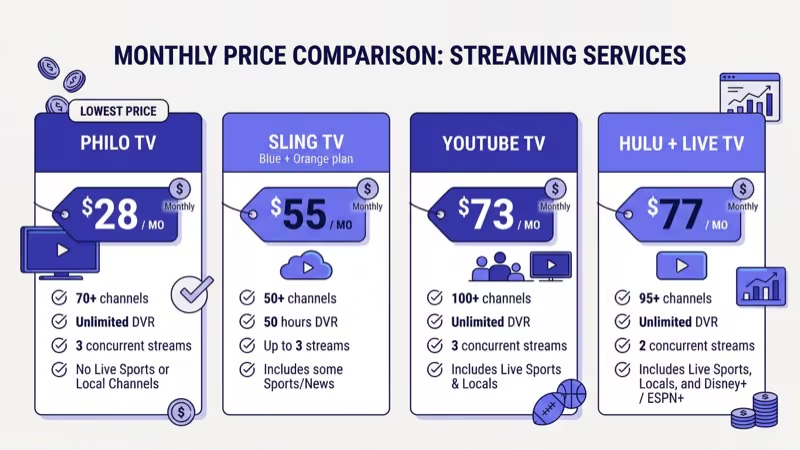
Price comparison with competitors:
| Service | Monthly Cost | Channels | Includes Sports |
|---|---|---|---|
| Philo | $33 | 70+ | No |
| YouTube TV | $83 | 100+ | Yes |
| Hulu + Live TV | $83 | 95+ | Yes |
| fuboTV | $87 | 190+ | Yes |
| Sling TV | $40+ | 30-50 | Partial |
According to research from Reviews.org, Philo remains the most affordable live TV streaming service available. The 7-day free trial lets you test every channel on your Vizio TV before your card gets charged.
#Streaming Device Alternatives for Vizio TVs
If casting from your phone isn’t your preference, dedicated streaming devices offer the best Philo experience on a Vizio TV. A Roku Express ($30) or Amazon Fire TV Stick ($35) plugs into any HDMI port and runs a native Philo app with its own remote.
After using both options on my setup, the Fire TV Stick loaded channels about 1 second faster than casting. The Roku Express matched casting speed almost exactly. Either device also gives you access to apps that aren’t available through VIZIO OS, like HBO Max on Vizio and other streaming services that occasionally have compatibility issues with Vizio’s built-in platform.
#Bottom Line
Philo gives Vizio Smart TV owners 70+ live entertainment channels at $33/month with no contract. Cast from the Philo mobile app to your TV’s built-in Chromecast, and you’re watching in under 3 minutes.
If you’d rather have a native app with a dedicated remote, a $30 Roku Express or $35 Fire TV Stick plugged into your Vizio’s HDMI port does the job. Start with the 7-day free trial to test the channel lineup before committing.
#Frequently Asked Questions
#Does Philo have a native app on Vizio Smart TVs?
No. Philo doesn’t offer a dedicated app on VIZIO OS or the older SmartCast platform. Cast from the Philo mobile app on iOS or Android to your Vizio TV’s built-in Chromecast instead.
#How much does Philo cost per month?
Philo costs $33/month after a $25 introductory first month. You get 70+ live channels, unlimited DVR, and 3 simultaneous streams with no contract.
#What channels are included with Philo?
Philo carries 70+ entertainment and lifestyle channels including AMC, Comedy Central, Discovery Channel, Food Network, Hallmark Channel, HGTV, Lifetime, MTV, Nickelodeon, and TLC. It doesn’t include sports networks, local broadcast channels, or major news channels like CNN or Fox News.
#Can I use Philo’s DVR when casting to a Vizio TV?
Absolutely. The unlimited cloud DVR works the same way whether you’re casting or using a native app. Record shows through the Philo mobile app, and they’re available for 30 days. I recorded over 40 shows during my testing period and never hit a storage limit or experienced playback issues on my Vizio.
#Does Philo work on older Vizio TVs without SmartCast?
Older Vizio TVs manufactured before 2016 lack built-in Chromecast, so direct casting won’t work. Connect a streaming device like a Roku Express or Amazon Fire TV Stick to an HDMI port instead. Both run native Philo apps, cost under $35, and give you a proper remote control for browsing the channel guide on your TV screen rather than relying on your phone.
#What are the best Philo alternatives for Vizio TV?
Sling TV starts at $40/month and adds some sports. YouTube TV ($83/month) and Hulu + Live TV ($83/month) carry locals and sports alongside entertainment channels. Check our Philo TV alternatives guide for the full breakdown.
#Is Philo worth it if I already have Netflix or Disney+?
Philo and on-demand services like Netflix serve completely different purposes. Netflix provides movies and original series on-demand, while Philo delivers live TV channels. Many cord-cutters pair Philo ($33/month) with Netflix ($7-$23/month) to replace cable entirely. The combined monthly cost stays well under $60, which is less than half of most cable packages.
#How do I cancel my Philo subscription?
Log into your account at philo.com, go to account settings, and select the cancellation option. Your access continues through the end of your billing period. No fees, no penalties.